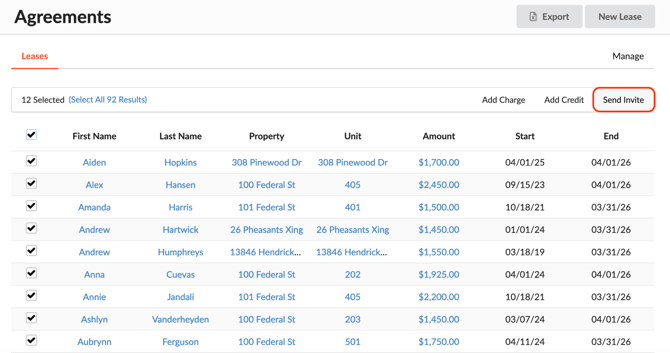
In Revela, first-time users can be invited to the Tenant Portal in two ways: individually or in bulk. This article explains both methods.
Sending Portal Invites Individually
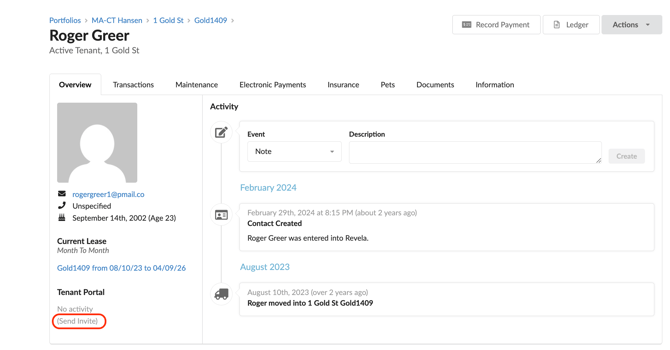
To send a portal invitation to an individual user: 1. Navigate to the user's profile dashboard in Revela. 2. Locate the Tenant Portal section of their profile overview. 3. Click the Send Invite button. Click the Send Invite button below the Tenant Portal section of their profile overview.
Notes
- A user must have an email address on file to receive a Revela portal invitation. To add one, go to the user’s profile dashboard and select Actions > Edit.
Sending Portal Invites in Bulk
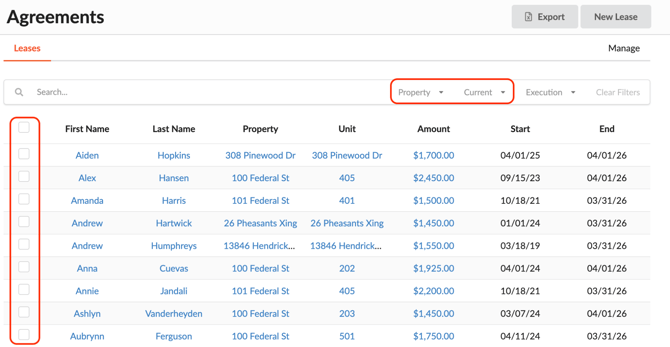
If you need to invite multiple individuals to Revela at once, you can do so from the Leasing > Agreements tab.
Select users for the bulk invite using either method: - Individually: Check the box next to each user's name. - By filter: Use filters (such as property name) to narrow down and select a group of users.
Once all desired users are selected, click the Send Invite button to send an invitation in bulk.