
Revela's AI Smart Tasks feature is designed to help property management teams work more efficiently by surfacing insights, suggesting next steps, and — in select cases — automatically handling routine tasks on your behalf. SmartTasks operate across three distinct levels of automation, each representing a step up in how actively the AI engages with your workflow.
From the start, the vision behind Revela AI has been to build an intelligent agent with access to data across the entire platform so it can surface meaningful insights and take action with full context. Smart Tasks are the practical expression of that vision, covering workflows across Accounting, Listings, and Maintenance.
Understanding the difference between the three Smart Task levels is key to getting the most out of the feature and knowing when to step in versus when to let the AI handle things on its own.
--
SmartTasks Catalog
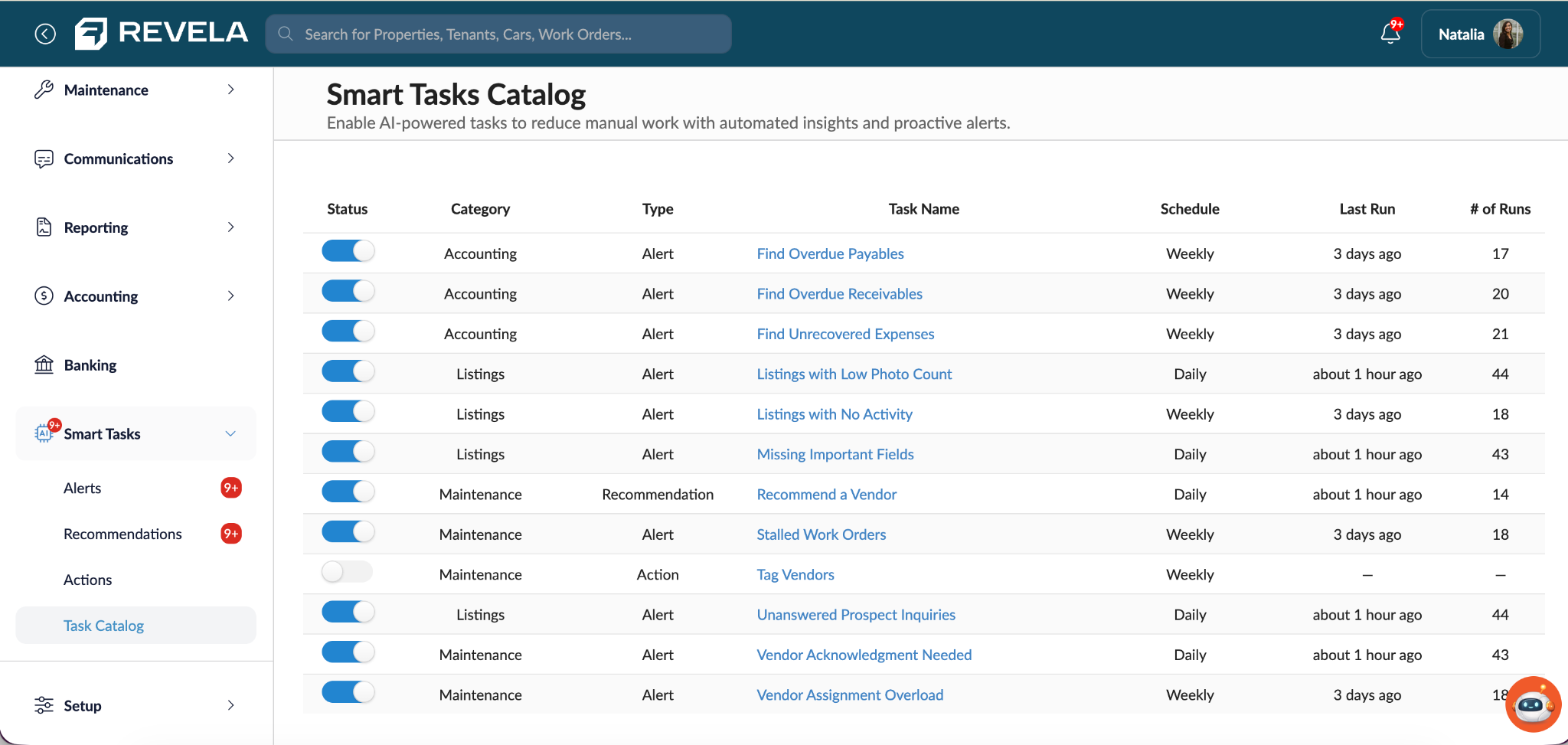
The SmartTasks catalog is a library of all the current SmartTasks available in each of the three categories.
You can find the full catalog under Smart Tasks > Task Catalog in the left navigation. It lists every Smart Task Revela AI currently offers, organized by workflow area. Today that's Accounting, Listings, and Maintenance, with more areas and tasks being added over time.
Each row in the catalog shows a task's status (on/off), its category, its type (Alert, Recommendation, or Action), its name, its schedule, when it last ran, and how many times it's run. Clicking a task's name opens its settings, where you can change its type and save — all without leaving the catalog.
Note: The scheduled cadence of the SmartTasks is not yet available which is why it is greyed out and unable to be adjusted. This will become available in a future product enhancement.
A few examples of what's in there today: Accounting tasks like Find Overdue Payables and Find Overdue Receivables flag aging balances; Listings tasks like Missing Important Fields and Unanswered Prospect Inquiries catch gaps in your marketing and lead follow-up; Maintenance tasks like Vendor Assignment Overload and Stalled Work Orders help keep repair work moving. New Smart Tasks continue to be added to the catalog as Revela AI expands.
The Three Levels of Smart Tasks
Alerts
Alerts are the foundation of Smart Tasks. At this level, the AI proactively monitors your data and surfaces notifications when something requires attention — but all action is left to you. Think of alerts as an attentive assistant tapping you on the shoulder. Nothing changes in your system automatically; you simply receive a heads-up that something is worth looking at.
Recommendations
Recommendations take things a step further by not just flagging an issue, but suggesting a specific course of action. When a Smart Task generates a recommendation, you'll see it in your Recommendations tab and can choose to accept or decline the suggestion. The AI does the analysis; you retain final approval before any updates are applied to your data.
Recommendations are particularly useful when the AI has identified something with a moderate degree of confidence — enough to surface a suggestion, but not enough to act without your review. Accepting a recommendation applies the change immediately; declining it dismisses it without any impact on your records.
Actions (Automated)
Actions represent full automation. When an AI Action is enabled, the system carries out the specified task on a set schedule without requiring manual review or approval for each instance. This is the highest level of Smart Task capability and is best suited for low-risk, repetitive operational tasks where the AI operates with a high degree of confidence.
Actions are designed to reduce manual overhead on repetitive tasks, freeing up your team to focus on work that genuinely requires human judgement. Every action taken is logged in the dedicated Actions tab within Smart Tasks, so you always have a complete, auditable record of what the AI has done on your behalf.
--
The Actions Tab
Smart Tasks now includes a dedicated Actions tab — a centralized place to see everything Revela AI is completing on your behalf. The Actions tab logs all AI activity across your enabled Smart Tasks for the past 30 days, organized by workflow area so your team can quickly monitor and review what has been done across your portfolio.
Each log entry displays the date and time the action was taken, the task name, and a summary of what was changed or updated. This transparency is intentional — Revela AI is designed to support your team, not operate invisibly in the background.
AI Actions: Vendor Tag Automation
The first AI Action available in Revela is automated vendor tagging. When enabled, this action runs on a weekly basis and reviews your vendor directory for any vendors that have not yet been tagged. For each untagged vendor, the AI analyzes available information — including the vendor's name, description, and profile details — and assigns up to three relevant tags.
Well-tagged vendors make it easier to find the right vendor when assigning work orders, maintain a cleaner and more organized vendor directory, and improve categorization consistency across your entire portfolio. Rather than relying on manual tagging across a large vendor list, the AI handles routine categorization automatically.
How confidence thresholds work: When the AI is highly confident in a tag assignment, it applies the tag automatically and logs it as a completed action. When confidence falls into a lower range — roughly 70 to 80 percent — the AI will not apply the tag on its own. Instead, it surfaces the suggestion as a Recommendation for your team to review and either accept or decline. You'll receive a notification in your Recommendations tab whenever this occurs, and the task name will be listed alongside the suggestion so you can quickly identify its source.
When to Use AI Actions
AI Actions are best suited for tasks that are repetitive, rule-based, and low-risk: situations where an error is easy to correct and the cost of manual effort outweighs the occasional need to review an edge case. Vendor tagging is a strong example: the consequences of an incorrect tag are minor and easily fixed, while the time savings across a large directory can be significant.
Actions may not be the right fit for tasks that involve financial transactions, resident-facing communications, or anything where an automated mistake would be difficult or costly to reverse. In those scenarios, the Recommendations level of Smart Tasks, where you retain final approval, is likely a better fit.
As Revela continues to expand the Smart Tasks catalog across Accounting, Listings, and Maintenance workflows, new actions will be introduced over time. Revela's approach is intentional: rather than moving fast and adding automation for its own sake, the goal is to deliver AI-powered workflows your team can genuinely trust and that materially change the way you work.
--
Enabling and Managing Smart Tasks
Smart Tasks can be enabled or disabled from the Smart Tasks catalog within Revela. Each task in the catalog displays its type — alert, recommendation, or action — along with a description of what it does and how it runs. When enabling an action, you'll see a note explaining how the AI handles lower-confidence scenarios, so you always know what to expect before turning a task on.
If you have questions about Revela AI or which Smart Tasks are right for your team, reach out to your Client Success Manager or contact support@revela.co.