
Revela AI is an intelligent assistant built into Revela. It has access to data across the platform, so it can surface insights and take action with the full context of your account behind it. Revela AI includes multiple core capabilities, including: answers from the Knowledge Base, Smart Task Recommendations, Smart Task Actions, and the Tenant Maintenance Agent.
Revela AI is designed to understand your data, learn your workflows, and help your team get ahead of work rather than chase it. This article explains how Revela AI works, what each capability does, and how to enable it for your team.
How Revela AI Works
Revela AI is built on three pillars:
- Alerts — Flag situations that need your attention.
- Recommendations — Surface work that needs action, with a clear path to resolution.
- Actions — Automate low-risk, repetitive tasks, such as tagging records.
Your team stays in control. A recommendation is never acted on until someone on your team accepts it, and Actions only run for the workflows you choose to enable. Every recommendation and action is logged for auditing, and you can review completed actions at any time in the Actions tab.
Answers from the Knowledge Base
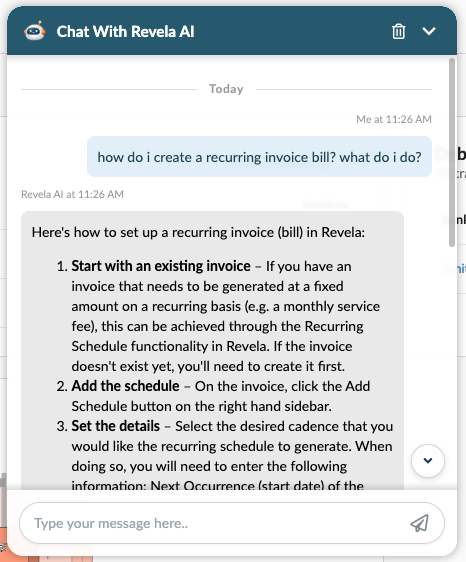
Ask Revela AI a question directly in your workspace, and it will answer using Revela's Knowledge Base, including guides, how-to articles, and FAQs. Click the Revela AI chatbot icon on the bottom righthand corner of your screen to access The Knowledge Base covers:
- Configuration
- Day-to-day operations
- Portfolio management
- Accounting and banking
Because answers come from within Revela, you can get help with a workflow without leaving the page you're working on or searching for documentation in a separate tab.
Smart Task Recommendations
Smart Task Recommendations identify opportunities and items in your account that need attention. Revela AI surfaces these on its own, so your team doesn't have to go looking for them. Each recommendation includes the context behind it and up to three suggested next steps.
To review recommendations, navigate to Smart Tasks > Recommendations. From there, accept a recommendation to move forward with it, or decline it if it doesn't fit.
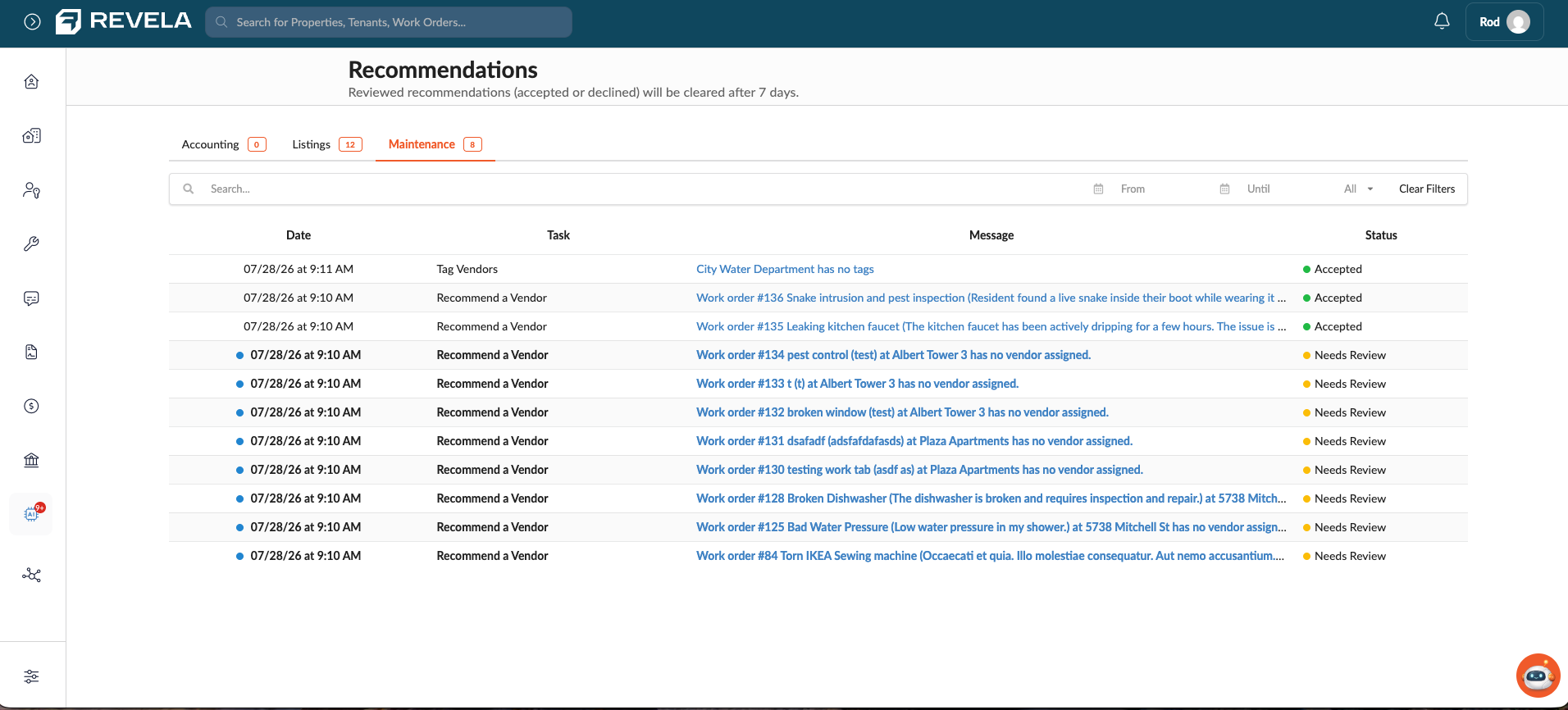
Example: Recommend a Vendor. When a new work order is submitted without a vendor assigned, Revela AI suggests appropriate vendors for the job.
Smart Task Actions
Smart Task Actions automate repetitive, low-risk tasks so your team spends less time on routine upkeep. You decide which workflows Revela AI handles by enabling them from the Smart Task Catalog.
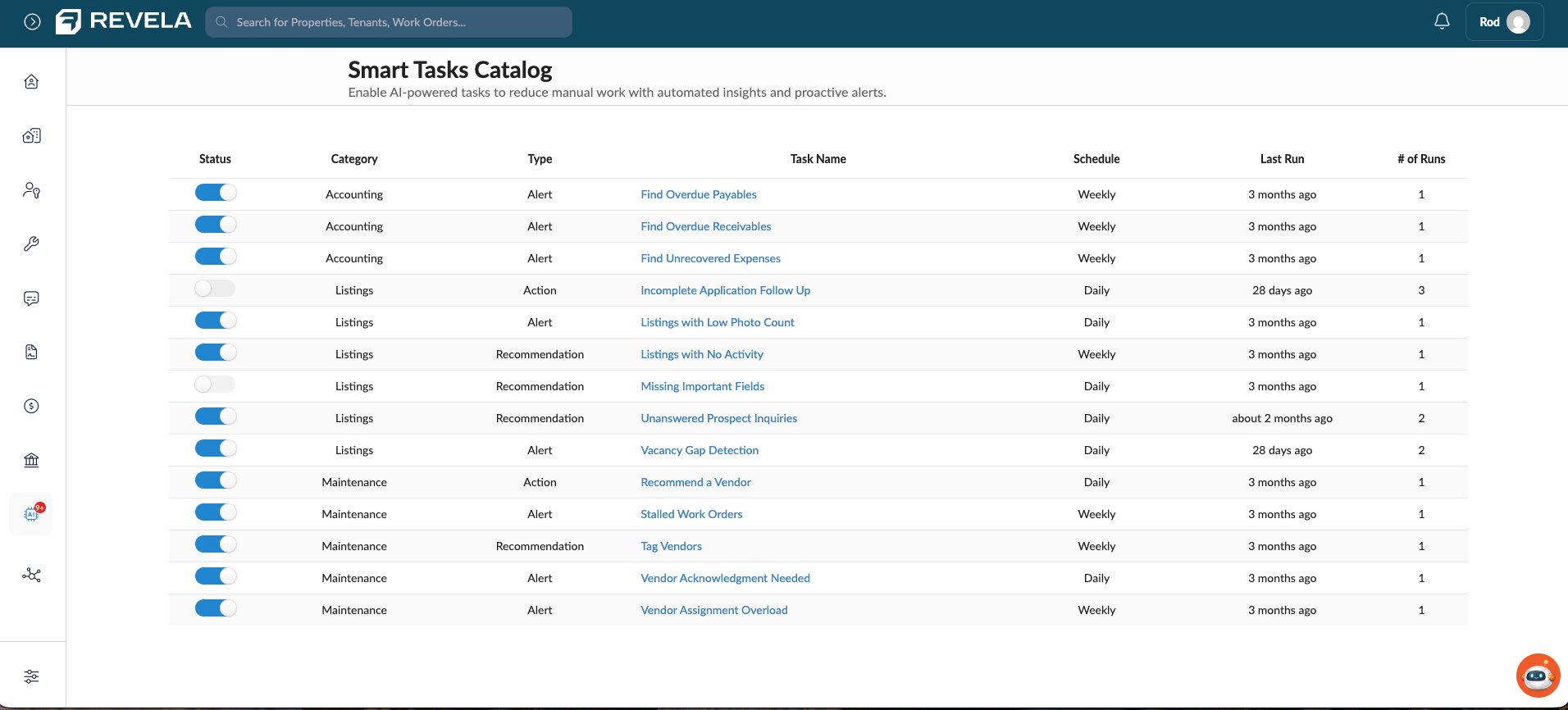
Every action Revela AI takes is recorded in the Actions tab, so your team can review exactly what happened.
Example: Tag Vendors. Revela AI automatically applies relevant tags to untagged vendors to keep your vendor directory organized.
The key difference between Recommendations and Actions is who makes the final call. A recommendation waits for someone on your team to accept or decline it, which makes it the right fit for decisions that need judgment, such as choosing a vendor for a job. An action runs on its own once its workflow is enabled, which is why Actions are limited to low-risk, repetitive tasks.
Tenant Maintenance Agent
The Tenant Maintenance Agent is a tenant-facing AI agent in the tenant portal. It helps tenants submit complete maintenance requests the first time, so your team spends less time following up for missing details. As a tenant submits a request, the agent will:
- Ask clarifying questions
- Gather photos upfront
- Flag likely duplicate requests
- Walk tenants through safe troubleshooting
- Attach an AI-generated summary to the work order
To turn on the agent, navigate to Setup > Organization Settings > Tenant Assistant. Note that the setting is labeled Tenant Assistant in Revela.
See the Tenant Maintenance Agent in action:
Enabling Revela AI for Employees
Revela AI is enabled on each employee's account. Any Administrator in your account can turn it on.
- Navigate to Setup > Employees.
- Click Edit on the employee's account.
- Select the AI Chat Assistant and AI Smart Tasks checkboxes.
- Click Save.
AI Chat Assistant gives the employee access to ask Revela AI questions, and AI Smart Tasks gives them access to Recommendations and Actions.
Note: The Tenant Maintenance Agent is not enabled per employee. It is turned on for your organization under Setup > Organization Settings > Tenant Assistant.
Get Started with Three Quick Wins
- Ask a workflow question. The next time you're unsure how to complete a task in Revela, ask Revela AI instead of searching for the answer.
- Review your Smart Tasks. Open the Recommendations tab to see what Revela AI has flagged, then browse the Smart Task Catalog to choose which Actions to enable.
- Turn on the Tenant Maintenance Agent. Enable the agent, then update your maintenance instructions to direct tenants to it so more requests arrive complete.
Tips & Best Practices
- Start with Recommendations before enabling Actions. Reviewing a few recommendations first shows you how Revela AI reads your account's data. Once you're comfortable with its suggestions, enable Actions for the workflows your team would otherwise handle by hand.
- Enable one Action workflow at a time, and check the Actions tab regularly for the first few weeks. This makes it easy to confirm each workflow is doing what you expect before you add the next one.
- Keep your account data complete. Revela AI draws on the data across your account, so its recommendations are only as good as the records behind them. For example, vendor suggestions depend on your vendor records — enabling the Tag Vendors action is an easy way to keep your directory organized.
- Ask specific questions. "How do I issue a refund to a tenant?" returns a more useful answer than "refunds." Include the area of Revela you're working in when it helps narrow the answer.
- Tell tenants about the agent. Mention it in your maintenance instructions and move-in communications so tenants know to use it. Keep your emergency maintenance contact easy to find, too — the agent helps tenants submit complete requests, but urgent issues like flooding or a gas leak should still go straight to your emergency line.
- Read the AI-generated summary first when triaging a work order. It gives you the key details at a glance, so you can decide quickly whether to open the full request and photos before assigning a vendor.