
Overview
- Purpose: This guide explains how tenants can submit maintenance requests and how property managers can receive notifications for new requests.
- Target Audience: Tenants, property managers, and admins.
Submitting Maintenance Requests (For Tenants)
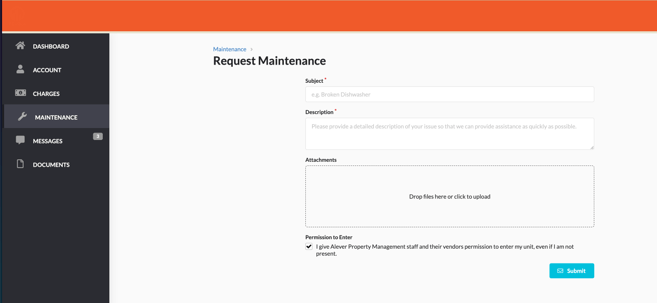
- Log into the Tenant Portal.
- Select ‘Maintenance’ from the menu.
- Provide the following details:
- A brief description of the issue.
- Attach photos (if applicable).
- Specify availability for an appointment.
- Submit the request electronically.
- Requests can be submitted via a desktop web browser or a mobile device (if enabled by the property).
Receiving Notifications of New Maintenance Tickets (For Property Managers)
- Ensure the ‘When a work order is submitted’ notification setting is enabled.
- This will notify you whenever a tenant submits a maintenance request.
- To enable notifications:
- Navigate to the black Account box in the upper-right corner of your screen.
- Go to Account > Notifications.
- Enable the setting to receive notifications or email alerts for new requests.
Best Practices, Tips, and Notes
- Encourage tenants to attach photos for better issue resolution.
- Verify that tenants specify their availability to streamline scheduling.
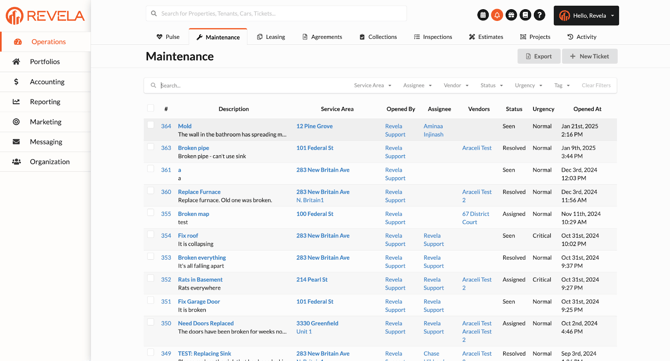
- Regularly check your maintenance feed to ensure no requests are missed.
Common Issues & Troubleshooting
Issue 1: Tenants are unable to access the maintenance request feature.- Solution: Verify that the tenant portal and maintenance request feature are enabled for the property.
- Solution: Double-check notification settings under Account > Notifications and ensure email alerts are enabled.