
Overview
-
Purpose: This guide explains how property managers can request contributions from property owners to cover upcoming expenses and projects on properties.
-
Target Audience: Property owners, Property managers
Step-by-Step Instructions
To request an owner contribution for a specific property, complete the following steps.
-
Navigate to Portfolios/Properties > Entities.
-
Select the entity from whom you are requesting funds from.
-
Go to Actions > Request Contribution.
-
Enter the contribution request details in the pop up screen.
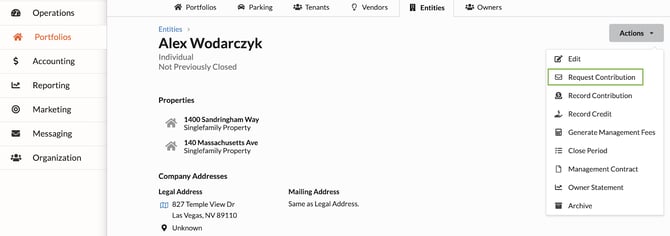
The entity profile page. Click the Actions button to display the dropdown and select “Request Contribution”.
The pop up that will appear upon selecting “Request Contribution”.
Owner Experience
Email Notification: Upon requesting the contribution, the owner contact will receive an email notification that directs them to their owner portal to complete the transaction.
Portal Experience: In addition, a banner will appear within their owner portal highlighting the request. The owner can click the banner and be directed to the payment page to complete the transaction and contribute the funds.
