
Overview
-
Purpose: This guide explains how property managers can communicate with property owners directly through the Revela portal.
-
Target Audience: Property owners, Property managers
Step-by-Step
Revela allows you to text and email owners directly through the system. These communications are recorded on the owner activity timeline. In addition, when an owner responds to your message, their response will also be automatically tracked.
Send an Email or Text Message to an Owner
To send an email communication to an owner:
-
Navigate to the owner's profile via Portfolios > Owners.
-
Click on the 'Actions' button in the upper right hand corner of the screen.
-
Select either 'Send Email' or 'Send SMS' from the Actions drop down menu.
-
A pop up screen (see below) will appear and be preset to send to the owner based on the email or phone number that is saved on their profile.
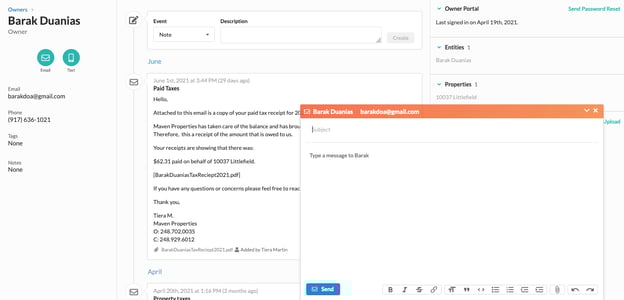
Note: If you do not see the SMS option available, your organization may not have provisioned a phone number yet. You can enable VoIP and provision a universal number for text messages to send from by following the instructions below.