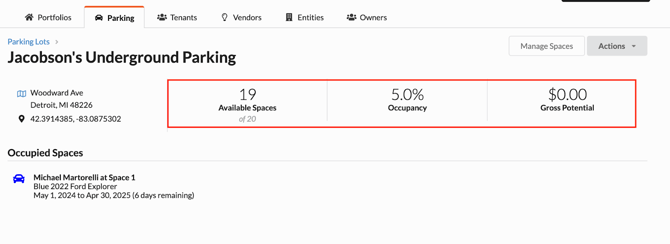
Benefits of Parking Lots through Revela:
- Enhance Security and Monitoring
-
- By assigning parking spots within Revela, your business can track which resident vehicles are parked in designated spaces. This visibility empowers users to easily track what vehicles belong to which residents or tenants, identify unauthorized vehicles, and ensure proper use of designated spaces to enhance overall safety within your parking areas.
- Flexibility in Space Allocation
-
- Revela makes it easy to reassign or repurpose parking spaces when required—whether it's due to an upcoming resident move-out, if your business is adding more parking capacity, and much more. This flexibility makes it easier to adapt to changing needs and fosters seamless parking management tailored to the needs of your property.
Getting Started
In the Portfolios section of Revela, select the “Parking” tab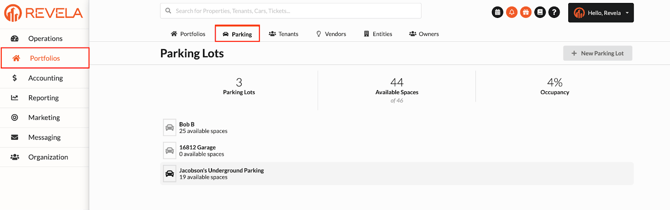
- Within the “Parking” tab, users have the ability to create a New Parking Lot, or add a resident registration to an existing Parking Lot that was previously created for a property.
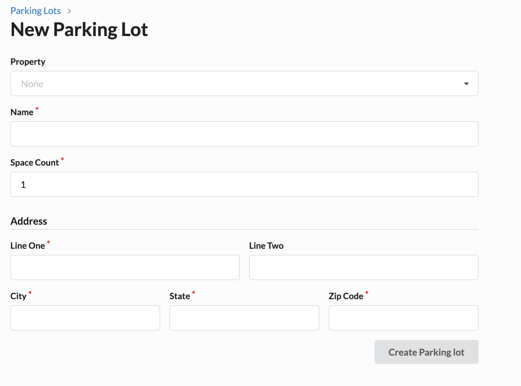
- The Property the Parking Lot is assigned to
- The Name of the Parking Lot
- The Space Count of the Parking Lot
- The Address Information, including the:
- Primary Address
- City
- State
- Zip Code
- Press “Create Parking Lot” to save
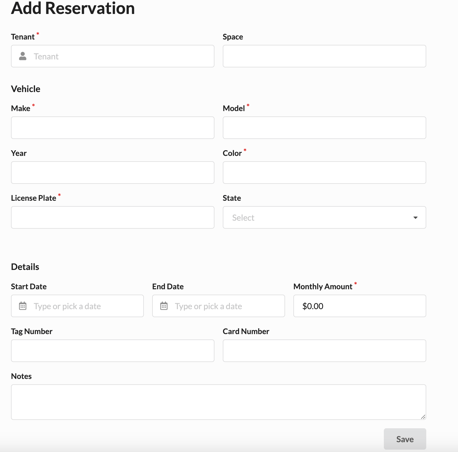
Assigning a Reservation to a Parking Lot. You can add reservations which will designate a member’s reserved parking space. To create a reservation you can select Actions > Add Reservation and enter the required reservation details:
- Member Name (Tenant)
- Space
- Vehicle Make (Chevrolet, Jeep, Subaru, etc.)
- Vehicle Model (Cruze, Wrangler, WRX, etc.)
- Year
- Color
- License Plate
- State
- Start and End Dates (timeframe the parking space is reserved)
Pro Tip: The Parking Lot overview page will offer a snapshot of a Parking Lot’s current occupancy