
How Payment Statuses Work in Revela
Every payment in Revela moves through a series of statuses as it is submitted, processed, and either completed or rejected. You can view a payment’s current status on the payment detail screen by navigating to Accounting > Payments and selecting the payment in question. The status is displayed with a color-coded label: green for completed, yellow for pending, blue for processing, and red for failed or canceled.
Revela supports three electronic payment methods: Bank Transfer (ACH), Card Payment (credit or debit), and Mail a Check for Me (mailed checks via PostGrid). Each method interacts with a different payment network, so the statuses behave differently, depending on which method was used. A bank transfer follows a multi-day settlement process through the national ACH network, a card payment is typically approved or declined within seconds, and a mailed check progresses through physical printing and postal delivery stages.
Regardless of the payment method, every payment in Revela passes through the same core set of statuses. Understanding these statuses, and how they apply to each payment method, is the key to knowing when a payment is still in progress, when it has completed, and when something has gone wrong.
---
The Payment Statuses
Revela uses five statuses for all payments. Each one tells you where the payment stands in its lifecycle:
- Processed - This status represents a payment that is in-transit. The payment has bee successfully submitted to the payment processor and has not yet settled into the intended receiving bank account yet.
- Settled - The payment has been successfully assigned to a payment batch and has settled in the recipient bank account. When a payment shows as settled/approved, no further action is needed, the payment has reached its destination.
- Rejected - This status is typically reserved for inbound ACH payments. This payment has been rejected for various reasons such as insufficient funds, incorrect account numbers, and disputes. The reason will be displayed on the payment record in a red box and is also visible on the Electronic Payments report.
- Dispute Handling - If a payment is disputed by the payee, the reject reason will display as General Reject. In addition, a Payload representative will reach out to the primary contact on file for the account to notify of the dispute, and what documentation will be necessary to counter and potentially overturn the dispute. If a dispute is successfully overturned, the original payment record will flip back into a Processed state until it Settles. Regardless of the dispute case outcome, a Payload representative will confirm the outcome of the dispute case via email.
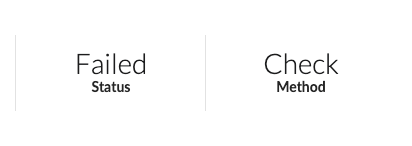
- Failed - This status is typically reserved for outbound ACH payments. It indicates that something went wrong and the payment was not successfully processed. When a payment fails, Revela automatically reverses the associated accounting entries so your books remain accurate. The specific reason for the failure is displayed on the payment detail screen in a red status message. Failed payments require attention. You will need to identify the cause and either resolve the issue or submit a new payment. For more detail on failure reasons, see Why Do Payments Fail in Revela?
-
- Failed ACH payments will typically read as “Charged Back” and display the failure reason:
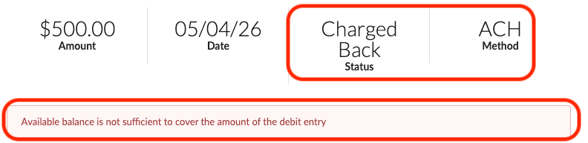
- Failed ACH payments will typically read as “Charged Back” and display the failure reason:
- Canceled - The payment was intentionally stopped before it completed. This can happen when you void a payment, cancel a mailed check, or when a transaction is voided at the processor level. Like failed payments, canceled payments are automatically reversed in your accounting records.
---
ACH (Bank Transfer) Statuses
ACH payments are electronic bank-to-bank transfers processed through the national ACH network. They are the most common method for paying owners and vendors in Revela, and they are also used when residents pay rent via bank transfer.
When you process a payables batch using Bank Transfer (ACH), each payment begins in Processed status. From there, the payment enters the ACH network, where it must be received and accepted by the recipient’s bank before it can settle.
Outbound ACH payments typically settle within one to two business days. Weekends and federal holidays are not processing days, so a payment submitted on Friday afternoon will not begin processing until Monday.
Once the recipient’s bank has accepted the transfer and the funds have settled, the payment moves to Settled. At this point, the recipient should see the deposit in their bank account.
It is important to understand that ACH payments can fail after initially appearing to process normally. Unlike card payments, the ACH network does not provide instant approval. A bank transfer can move to a Processed status and then be returned by the recipient’s bank days later. For example, if the account has insufficient funds or the account number is invalid. When this happens, the payment status changes to Failed, and Revela automatically reverses the accounting entries. This delayed failure pattern is normal for ACH and does not indicate a problem with Revela.
-----
Credit and Debit Card Payment Statuses
Card payments work differently from ACH because approval or decline typically happens the moment the payment is submitted. When a resident pays rent with a credit or debit card through their portal, the card network verifies the transaction almost immediately.
If the card is approved, the payment moves to Processed status right away. There is usually no extended period of processing for card transactions because the response comes back within seconds of submission. Behind the scenes, the actual settlement of funds to the property manager’s account typically takes a few business days, but from a status perspective, an approved card payment shows as Settled as soon as the payment is assigned to a settlement batch.
If the card is declined, the payment moves to Failed status instantly, and the specific decline reason (e.g., insufficient funds, expired card, or a generic decline from the card issuer) is displayed on the payment detail screen. Because credit card declines happen in real time, there is no ambiguity about whether the payment went through; you and the resident will know immediately.
NOTE: Card payments will occasionally show a Processing status if the payment processor has accepted the transaction but has not yet confirmed final approval. This is uncommon and typically resolves within minutes. If a card payment remains in processing for more than an hour, it may indicate a communication issue with the payment processor, and you should check back shortly.
-----
Mailed Check (PostGrid) Payment Statuses
When you select Mail a Check for Me as the payment method, Revela generates a physical check and sends it through the mail via PostGrid. Because this process involves printing, packaging, and physical delivery, mailed checks move through several distinct stages that you can track in Revela.
After processing a payables batch (or single invoice) with the mailed check option, each payment starts in Check Processing status while Revela prepares and submits the check order to PostGrid.
During the processing phase, the check progresses through three internal stages: the check is first queued for production, then printed, and finally packaged for mailing. Throughout all three of these stages, Revela displays the check status as Check Processing with a yellow label. You do not need to take any action during this time, the check is being prepared and will be mailed shortly.
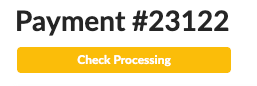
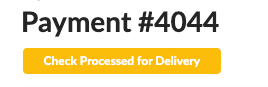
Once the check has been handed off to the postal service, the status updates to Check Processed for Delivery. This means the physical check is now in the mail. Delivery time depends on the postal service, but you can generally expect the recipient to receive the check within five to seven business days of this status appearing. NOTE: Delivery times may vary due to USPS processing times and other USPS-related circumstances outside of Revela’s and PostGrid’s control.
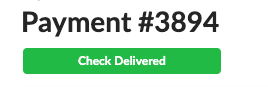
When PostGrid confirms that the check has been delivered, the status changes to Check Delivered with a green label, and the payment itself moves to Completed. At this point, the recipient should have the check in hand.
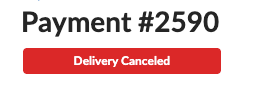
If something goes wrong during any stage, for example, an address issue is detected or the check cannot be printed, the check status changes to Delivery Canceled, and the payment is automatically voided. The most common reasons for mailed check failures are missing or unverified addresses and incomplete bank account configuration.
Mailed checks can be canceled while they are still in the early processing stages (i.e. before printing is complete). To cancel a check, open the payment and select Cancel Check from the Actions menu. Once a check has been processed for delivery, it can no longer be canceled through Revela, but it can still be voided after delivery if needed by contacting your bank branch.
--
How Long Should Each Status Last?
Setting accurate expectations about payment timing is one of the most helpful things you can do when communicating with residents, owners, and vendors. Below is a general guide on how long payments typically remain in each status.
- For ACH payments:
- If an ACH payment has been in processing for more than five business days without moving to the Settled/Failed status(es), it is worth investigating. However, keep in mind that weekends and federal holidays do not count as processing days. A payment submitted on Thursday afternoon may not settle until the following Monday or Tuesday.
- Processing typically lasts three to five business days.
- For card payments:
- If a card payment is stuck in Processed for more than 3 days, something unusual may be happening with the payment processor. Check back shortly, and if the status has not changed, reach out to your Revela Support Representative.
- For mailed checks, the timeline is longer by nature:
- NOTE: The entire process from batch submission to confirmed delivery of a mailed check can take one to two weeks.
- Check Processing (which covers preparation, printing, and packaging) typically takes one to three business days.
- Check Processed for Delivery means the check is in the postal system, and delivery usually takes five to seven additional business days depending on the destination, but results may vary.
What to Do (and Not Do) While Waiting
The most important rule when a payment is in Processing status is to wait. Payments move through external networks that Revela does not control, and each network has its own processing timeline. Taking premature action, such as voiding a payment and resubmitting it, can create duplicate payments, accounting confusion, and unnecessary complications for the recipient.
Do not void or reprocess a payment simply because it has not moved to a completed status yet. Check the expected timeline for the payment method first. An ACH payment in processing for one business day is completely normal. A mailed check in the processing stage for two days is expected.
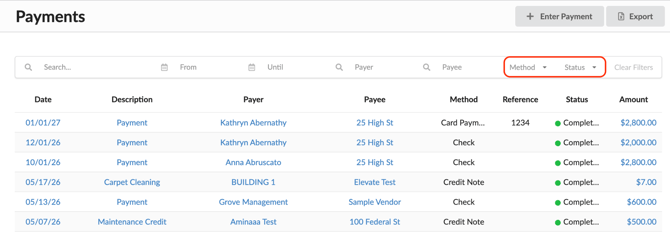
If you need to verify the status of a specific payment, open the payment detail screen from Accounting > Payments. The current status, payment method, and any relevant status messages are all displayed there. For mailed checks, the specific check stage (processing, processed for delivery, or delivered) is shown on the payment sidebar.
If a payment has been in an unexpected status for longer than the timelines described above, reach out to your Revela Support Representative for assistance. Do not attempt to resolve stuck payments by creating duplicate transactions, as this will result in double charges or double disbursements that require manual correction.
---
Answering Common Questions About Payment Timing
Questions from Residents
Residents frequently ask when their rent payment will be reflected on their account. For ACH payments, let them know that bank transfers typically take one to two business days to process and that the payment will appear on their ledger once it has been confirmed by their bank. If they paid on a Friday or before a holiday, remind them that processing does not occur on weekends or bank holidays.
For card payments, the charge should appear on their card statement almost immediately. If a resident says they do not see the charge, ask them to check for a pending transaction with their card issuer, it may take a day or two to appear on their statement, even though Revela has already recorded the payment as completed.
If a resident’s payment shows as Failed, direct them to check their email for a notification explaining the reason (advise them to check their spam and/or junk folder if they cannot locate the email with the failure reason). In most cases, they will need to verify their payment method and retry through their portal. Remind them that if they have a scheduled (recurring) payment set up, a failure will pause future autopay runs until they successfully retry the failed payment.
Questions from Owners
Owners most often ask when they will receive their disbursement after you process owner payments. For ACH disbursements, let them know that the funds are typically deposited within one to two business days after the batch is processed. If the payment was processed late in the day or before a weekend, explain that settlement may extend to the next business day.
For mailed check disbursements, set expectations that the check will be printed and mailed within a few business days, and postal delivery typically takes an additional five to seven business days. If an owner has not received their check after two weeks, check the payment status in Revela, if it shows Check Delivered, the issue may be with their mail delivery, and you may need to void the check and reissue it.
If an owner asks about a payment that shows as Processing, reassure them that the payment is in progress and provide the expected timeline based on the payment method. Avoid making specific promises about exact arrival dates, as settlement timing depends on banking networks and postal services outside of Revela’s control.
Questions from Vendors
Vendor payment inquiries follow the same patterns as owner inquiries. For ACH payments, communicate the one-to-two business day timeline. For mailed checks, communicate the longer timeline and confirm the vendor’s mailing address is correct in Revela.
If a vendor reports that they have not received a payment, check the payment status first. If it shows Settled for an ACH payment and the funds have left your account, the vendor should check with their bank. If it shows Check Delivered for a mailed check, the postal service has confirmed delivery, the vendor should check their mail processing. If the payment is still in Processing, let the vendor know the payment is in progress and provide the expected arrival window.
-----
Best Practices
- Always check the payment status on the payment detail screen before taking any action or responding to inquiries. The status, payment method, and any failure messages give you everything you need to understand where a payment stands and what, if anything, needs to happen next.
- For mailed checks, verify that all payee addresses are confirmed and that your bank accounts are fully configured for check mailing before processing a batch. Address issues are the single most common reason mailed checks fail, and catching them upfront saves significant time compared to reprocessing after a failure.
- When communicating timelines to residents, owners, and vendors, provide ranges rather than exact dates. “One to two business days” for ACH and “one to two weeks” for mailed checks are accurate, practical expectations that account for normal variation in processing times. Avoid promising same day or next-day delivery unless you are certain the payment was submitted early enough in the day to meet the processing cutoff.
- If a payment has failed, always create a new payment rather than trying to edit or resubmit the failed record. The original payment and its automatic reversal entries remain in the system as part of your audit trail.