
What are Customer Entities in Revela?
In Revela, a Customer Entity represents the legal entity that owns a portfolio of properties. For example, if Bob Jones owns properties through his company Bob Jones LLC, then Bob Jones LLC would be the entity recorded in Revela. This distinction helps ensure accurate ownership records, tax reporting, and portfolio organization. Owners—like Bob Jones himself—can be linked to the entity, establishing the connection between individuals and the properties they own through their business.
Managing Customer Entities
Entities Table
The Entities table, as shown below, can be accessed by navigating to Portfolios > Entities. This table will offer a comprehensive list of all of your customers, which properties they own, their primary contact and the last time their accounting period was closed:
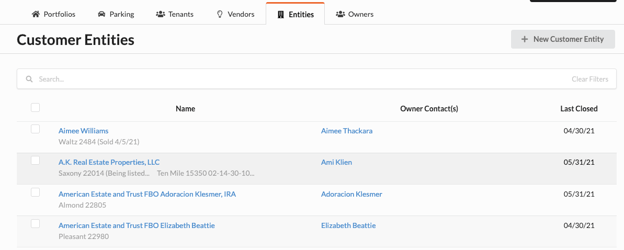
To add a new entity, simply hit the ‘New Customer Entity’ button and fill out the form, most of which can be found on a W9:
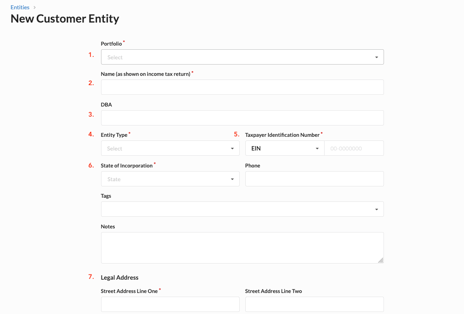
- Portfolio
-
- The portfolio determines which property group and configuration apply to this entity.
- Name
-
- The legal name of the entity which is found on the W9.
- DBA
-
- A Doing Business As name, which is only applicable if the entity has filed the appropriate paperwork to operate with a DBA.
- Entity Type
-
- The Entity type drop down determines what type of entity this is and established broad rules for treatment during tax season and year end.
- Taxpayer Identification Number
-
- The taxpayer ID will be found on the W9, and is needed to file 1099s at year end.
- State of Incorporation
- Legal Address