
Overview
Revela has a suite of four management revenue reports designed to give third-party property managers greater visibility into their revenue streams. These reports give property managers different ways to analyze their revenue performance, as well as help identify where users need to take action to ensure all expenses are billed back to a property.
Best Practices for Using the Management Revenue Reports
- Prevent Revenue Loss: Regularly check the Unrecovered Expenses Report to identify and bill back missed maintenance costs.
- Compare Portfolios: Leverage the Consolidated Management Income Statement to track performance across multiple property portfolios.
- Optimize Revenue Streams: Use the Management Revenue Report to analyze which categories are generating revenue and identify areas where billing practices could be improved.
- Where to Find the Management Revenue Reports
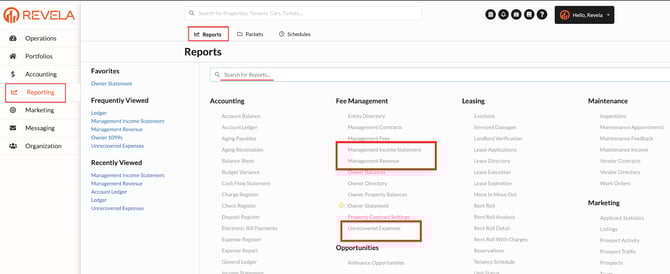
These reports can be found by navigating to Reporting > Reports > Fee Management OR they can be found by searching in the Reports search bar:
“Management Income Statement”, “Management Revenue”, “Unrecovered Expenses”
Management Income Statement
This report provides a traditional income statement, specifically tailored for the management company. It serves as a standalone financial view of a particular portfolio for a given period of time.
How to Best Use this Report: Run this report monthly to see the management company's net income at an overall or individual portfolio level. Note that revenue will be understated for a particular month if management fees have not yet been generated for that month.
If a management company operates nationally or in multiple states, This report allows filtering by Region (State), which will provide a snapshot based on properties located within that area making it simple to determine profitability across multiple geographic locations.
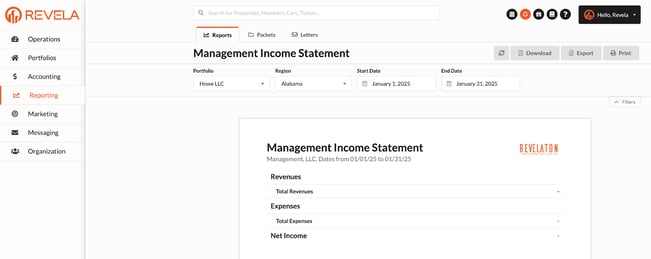
You can filter this report by:
- Portfolio: Help property managers compare revenue and expenses across different portfolios.
- Region (State) : If applicable, depending on the management company’s setup. This allows a property manager to report on net income by the location of managed properties.
- Time Frame: Users can specify a Start Date and End Date to analyze revenue within a selected period which facilitates monthly, quarterly, or annual financial reviews.
Consolidated Management Income Statement
While the Management Income Statement focuses on an individual view, the consolidated version serves as a comparative view, allowing for analysis and comparison of revenue and expenses across different portfolios. In this report, income statements are visible at an individual portfolio level, as well as at an aggregated level.
How to Best Use this Report: Run this report monthly to compare net income and performance across different managed portfolios. This report is also ideal for determining what portfolios are driving the largest percent of your net income, or calculating your net income per unit.
- Net Income Per Unit = Portfolio Net Income / # of Units in Portfolio
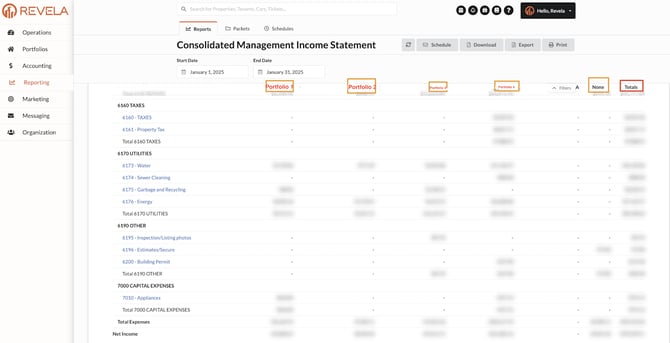
Key Features:
- Portfolio-specific breakdowns displayed in separate columns.
- Reduces the need for manual exports and spreadsheet consolidation.
- Helps larger management companies quickly compare revenue performance across different portfolios.
Management Revenue Report
This report summarizes the markup on all expenses billed back to managed properties. It provides a breakdown of how much revenue was generated from specific types of markups over a specific period, offering insights into your company's revenue by type of maintenance, work performed, or type of expense.
For example, if a management company wants to see the net income from maintenance activities associated with HVAC, that can be setup as a specific mark up line item so it can be determined at a glance how much the company is netting from the markups on HVAC maintenance activities.
How to Best Use This Report: Run this report in Summary display mode on a monthly basis along with an income statement.
- Ensure overall net income on both reports match
- Review Recovered Activity line items. If Recovered Activity line items are not net positive or appear low, that is a flag to the user to do the following:
- Toggle to Detail display mode to determine where the majority of expenses are from that are eating into top line revenue.
- Navigate to the Unrecovered Expenses report to determine if there are expenses that have not been billed back that could be dragging down the net income for a specific recovered activity line item.
Please note: This report requires set up and configuration to ensure the revenue breakdown aligns with a company's desired view. Revenue mark up categories can be as complex or simple as the company prefers. This will be completed upon implementation for new clients, and for existing clients, your Client Success Manager will be reaching out to help configure.
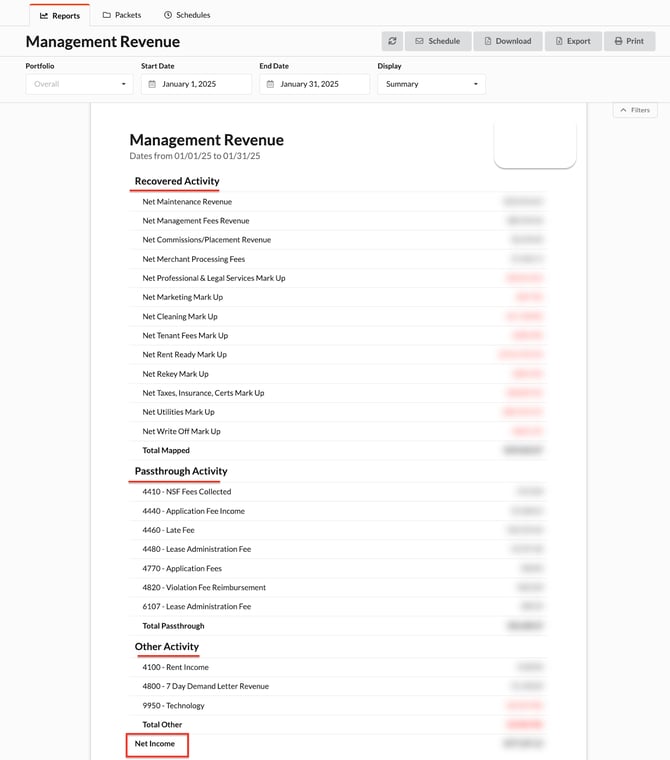
You can filter this report by:
- Portfolio: Helping property managers compare earnings across different portfolios.
- Time Frame: Users can specify a Start Date and End Date to analyze revenue within a selected period which facilitates monthly, quarterly, or annual financial reviews.
- Display: This report can display in two different views: Detail and Summary.
- Detail - Shows top line revenue recouped from the expenses that are mapped to the revenue account, and displays all of the expenses that are subtracted from the top line revenue to equal the net mark up income for that recovered revenue type.
- Summary - Displays net income for a specific Recovered Activity line item and hides the top line revenue and individual expenses that map to the recovered revenue type.
Unrecovered Expenses Report
- Who Should Use this Report? Best for property managers operating in a trust accounting model, where the management company is typically paying for managed property expenses out of the trust account and billing the expense back to the property. It is critical for the property manager to recoupe these expenses or else the repairs for a property are coming out of the management company's pocket.
- What Does the Report Show? The report aggregates invoices that have been billed to the management company from a third party vendor, but not forwarded to the managed property.
- How to Best Use this Report: This report is especially useful for weekly or biweekly financial reviews to ensure that no revenue is slipping through the cracks.
- Work Order Status - If a work order status is Resolved or Closed, this work order should be reviewed and billed immediately. If it is In Progress, then it may not need immediate attention due to the fact that work may not be complete yet.
- No Work Order Status - If a transaction does NOT have a work order associated with it, the invoice should be reviewed to determine if it needs to be forwarded to a managed property.
- Billing Timing - Please note that if an an invoice from a previous month was not forwarded, when the invoice is forwarded the post date of the forwarded invoice will be the day it is forwarded, therefore the charge will appear on the owner statement in the current period and will not retroactively impact owner statements.
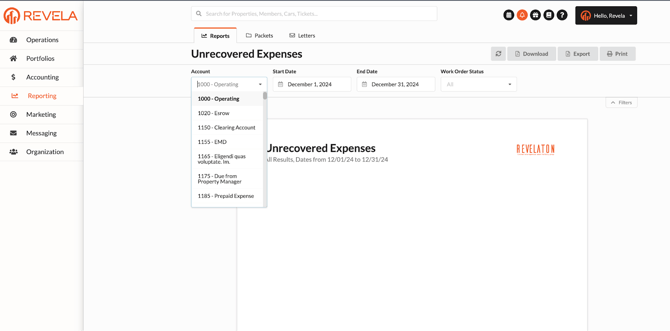
You can filter the report by:
- GL Accounts - Allows managers to filter by account type to investigate specific missing transactions.
- Work Order Status - Helps prevent missed revenue opportunities by flagging closed work orders where the associated invoice was not billed back.
- Time Frame - Helps analyze revenue within a selected period from a Start Date to End Date.
Entity Directory
Definition:
A centralized list of all legal entities within the system, such as ownership groups, LLCs, or corporations associated with properties.
Use Cases:
- Quickly locate entity-level information
- Manage contact info, tax IDs, and structure
- Link entities to properties and owners
- Organize reporting at the entity level
Management Contracts
Definition:
A report or module showing details of management agreements between the property management company and property owners.
Use Cases:
- Review contract terms, including duration and renewal dates
- Track fee structures and service responsibilities
- Ensure compliance with contractual obligations
- Prepare for renegotiation or renewals
Management Fees
Definition:
A report that shows fees earned by the management company, typically based on rent collected, fixed amounts, or other structures outlined in contracts.
Use Cases:
- Verify proper calculation of management fees
- Track fee revenue by property or portfolio
- Reconcile management income with contracts
- Provide transparency to owners
Owner Balances
Definition:
A report showing the current financial position of each owner, including any amounts due to or from them.
Use Cases:
- Determine if an owner has a positive or negative balance
- Track disbursements, contributions, and withholdings
- Communicate financial standing with owners
- Assist with month-end or year-end reconciliations
Owner Directory
Definition:
A contact directory of all owners across properties or portfolios in the system.
Use Cases:
- Quickly access contact details for communication
- Manage mailing preferences or payment settings
- Maintain up-to-date ownership records
- Use for sending statements, notices, or reports
Owner Property Balances
Definition:
Shows financial balances specific to each property owned by an individual owner, breaking down balances at the property level rather than in aggregate.
Use Cases:
- Provide detailed transparency to multi-property owners
- Reconcile income and expenses per property
- Assist with owner reporting and tax preparation
- Track reserve balances or earnings per asset
Owner Statement
Definition:
A summary report sent to property owners showing income, expenses, and net distributions for a specific period.
Use Cases:
- Monthly or quarterly reporting to owners
- Provide a clear record of financial activity
- Attach receipts, invoices, or supporting documents
- Fulfill management contract obligations
Property Contract Settings
Definition:
Settings and configuration details that define how each property is managed under its respective contract—may include fee structures, reporting options, or custom rules.
Use Cases:
- Customize management settings per property
- Align operational details with legal agreements
- Automate fee calculations and settings
- Support consistent compliance with contract terms