Overview
-
Purpose: Paying the full balance of an invoice.
-
Target Audience: Tenants, Property Managers, and Employees.
Step by Step
To simplify the process of paying vendors and to enable better cash management practices, we encourage clients to utilize Revela's ability to process your payables batches to pay vendors. Revela is able to pay vendors on your behalf using our payables batching process. Here's how it works:
-
Invoice is created (and approved if needed)
-
Add the invoice to a batch
That's it! Revela will then submit payment either via ACH or check for any invoice within the batch. Batches are processed on a weekly basis (typically Wednesday or Friday depending on your organization).
Here is a more detailed breakdown:
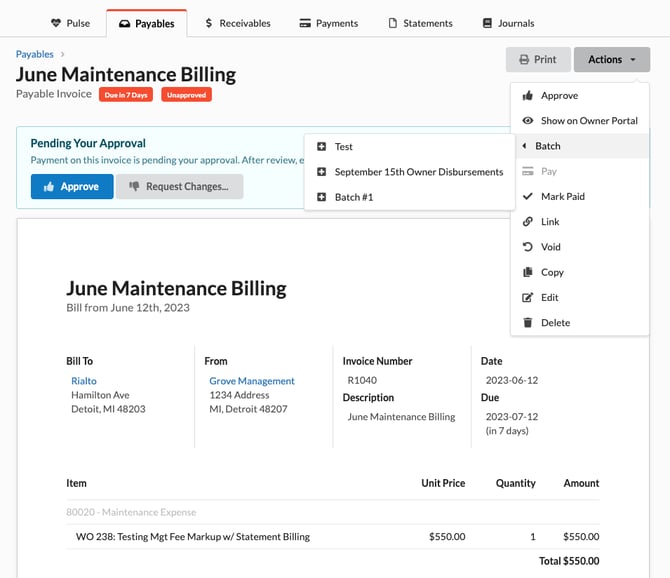
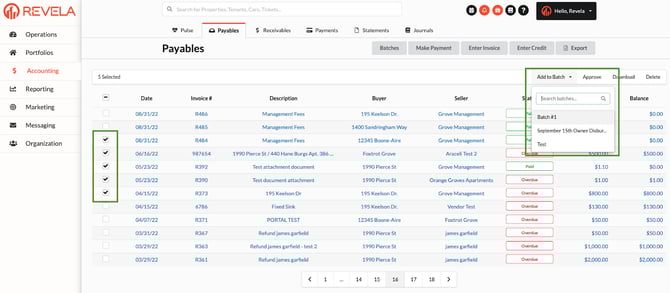
Each week Revela will create a Payables Batch. You can review all of payables batches on the batches screen (Accounting > Payables > Batches). You can add invoices to a Batch by clicking Actions, then Batch. You can also add invoices in bulk by navigating to Accounting > Payables, and selecting the invoices you want to add to the batch and selecting the "Add to Batch" that appears in the payables search bar.
Adding a single invoice to a batch
Adding multiple invoices to a batch
How Approvals Impact Payables Batching
If your organization has enabled an approval process, we will not be able to process the payables batch until all invoices are approved. Unapproved invoices will be automatically removed from the payables batch at the time of processing.
How to See What Batch an Invoice Was Included In
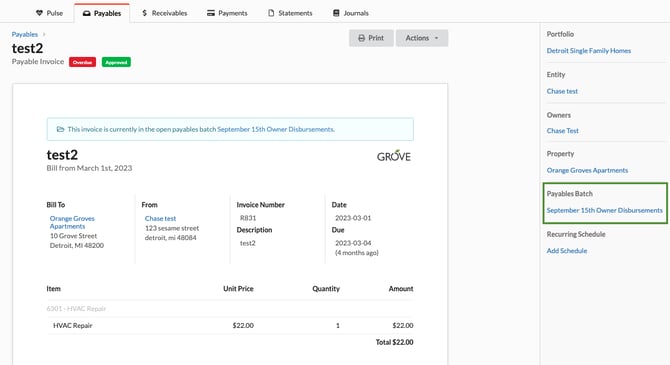
If an invoice was paid as part of a payables batch, when you navigate to the invoice, you will see a section in the sidebar on the right hand side that highlights which batch it was included in. It will also link to the batch summary showing all invoices that were included in that particular batch.