
Overview
- Purpose: Approve Invoices
- Target Audience: Property managers, accounting staff, and admins.
Step-by-Step
-
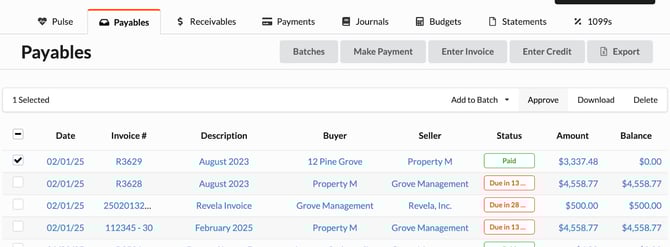
Accounting > Payables > “Check Mark Invoice” > “Approve”
-
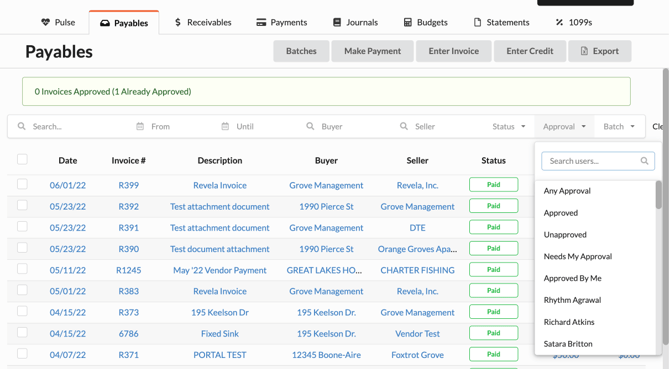
The Approval Filter has a drop down arrow with the following options to organize Invoices:
-
Any Approval
-
Approved
-
Unapproved
-
Needs My Approval
-
Approved by Me
-
Employee Names
-
-
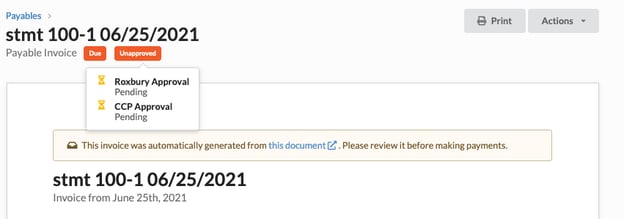
Revela allows users to configure an accounts payable approval process to ensure expenses are not paid without the authorization of key stakeholders. These stakeholders include different employee roles and property owners. To check where an invoice is in the approval process, simply hover over the ‘Unapproved’ tag.
-
Revela allows you to set unlimited levels of approvers, and you can white list certain vendors allowing them to circumvent the approval process.