
Overview
Purpose: This guide explains how to schedule a tour for a prospect within Revela, making the process seamless and efficient.
Target Audience: Leasing agents, property managers, and admins.
Step 1: Access the Prospect’s Profile
-
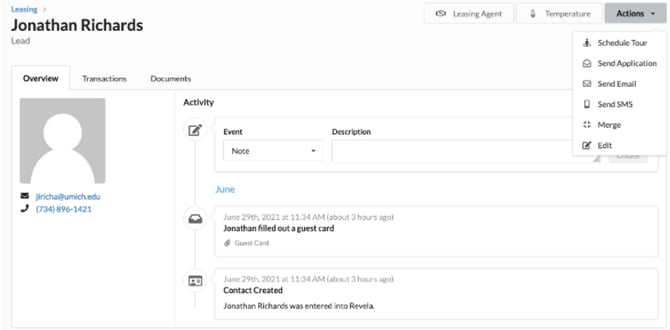
Navigate to Operations (left menu) > Leasing (top toolbar) in Revela
-
Select the prospect who wants to schedule a tour
Step 2: Schedule the Tour
-
Click the Actions dropdown in the prospect’s profile
-
Select Schedule Tour from the menu
-
Follow the on-screen prompts to set the tour date and time
Step 3: Confirm and Notify the Prospect
-
Review the scheduled tour details to ensure accuracy
-
Enter the property, tour guide, time and a brief message
-
Send a confirmation to the prospect via email or text (if applicable)
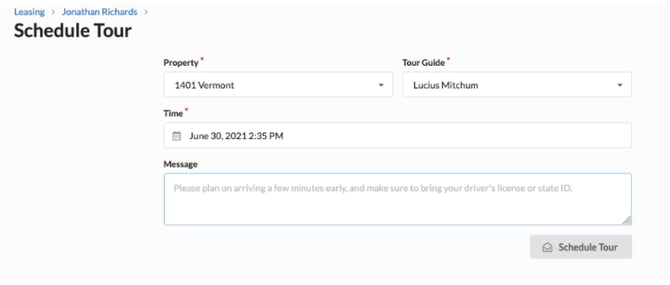
Once you click the Schedule Tour button, the prospect will receive a calendar invite as well as specific instructions established on the property’s listing page.
Best Practices, Tips, and Notes
-
Always verify the prospect’s availability before confirming the tour
-
If the prospect needs to reschedule, simply revisit their profile and update the tour details
Common Issues & Troubleshooting
Issue 1: The Schedule Tour button is not available
-
Solution: Ensure the prospect profile is fully created and that the leasing team has permissions to schedule tours
Issue 2: The prospect did not receive a confirmation
-
Solution: Verify that the prospect’s email or phone number is correctly entered in their profile