
Overview
Purpose: This guide explains how to re-send a portal invite to a tenant, ensuring they can access their Revela account.
Target Audience: Leasing agents, property managers, and admins.
Step-by-Step
- Navigate to the Tenant Profile
- Go to Portfolios (left menu) > Tenants (top toolbar)
- Search for and select the tenant’s name
- Re-Send the Portal Invite
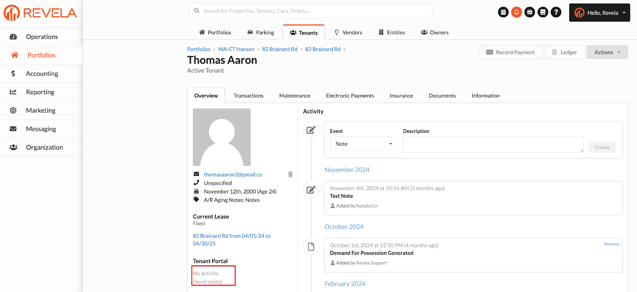
- Inside the Tenant Profile, go to the Tenant Portal section
- Click Send Invite to resend the invite
- Note: After the initial portal is sent to the tenant, reminder emails to confirm their account are automatically sent on days 2, 5, 10, 15, and 30
- Verify the Email Address
- Confirm the tenant’s email address is correct (located under their profile picture)
- If the email is incorrect, update it before resending the invite
- Confirm Email Delivery
- The system will send the portal invite to the email on file
- Instruct the tenant to check their spam or junk folder if they don’t see the email in their primary inbox
Best Practices, Tips, and Notes
- Always verify the tenant’s email address before resending the invite
- If the tenant still doesn’t receive the invite, advise them to add Revela’s email to their contacts to prevent spam filtering
- If a tenant is having trouble resetting their password, use the Send Password Reset option. It will be available if they have already activated their accounts
Common Issues & Troubleshooting
Issue 1: Tenant does not receive the portal invite- Solution: Double-check the email address and instruct the tenant to check their spam or junk folder
- Solution: Update the email in the Tenant Profile before resending the invite