
There are situations in which a management company must issue a refund to a resident. For example, if a resident accidentally submits multiple payments by mistake and requests to be reimbursed.
If a resident accidentally submits multiple electronic payments via their Revela portal, the easiest way to issue a refund is directly from the duplicate payment record.
On the tenant’s ledger history, navigate to the second payment that is causing a credit balance on their account and select Actions > Refund, as shown below:
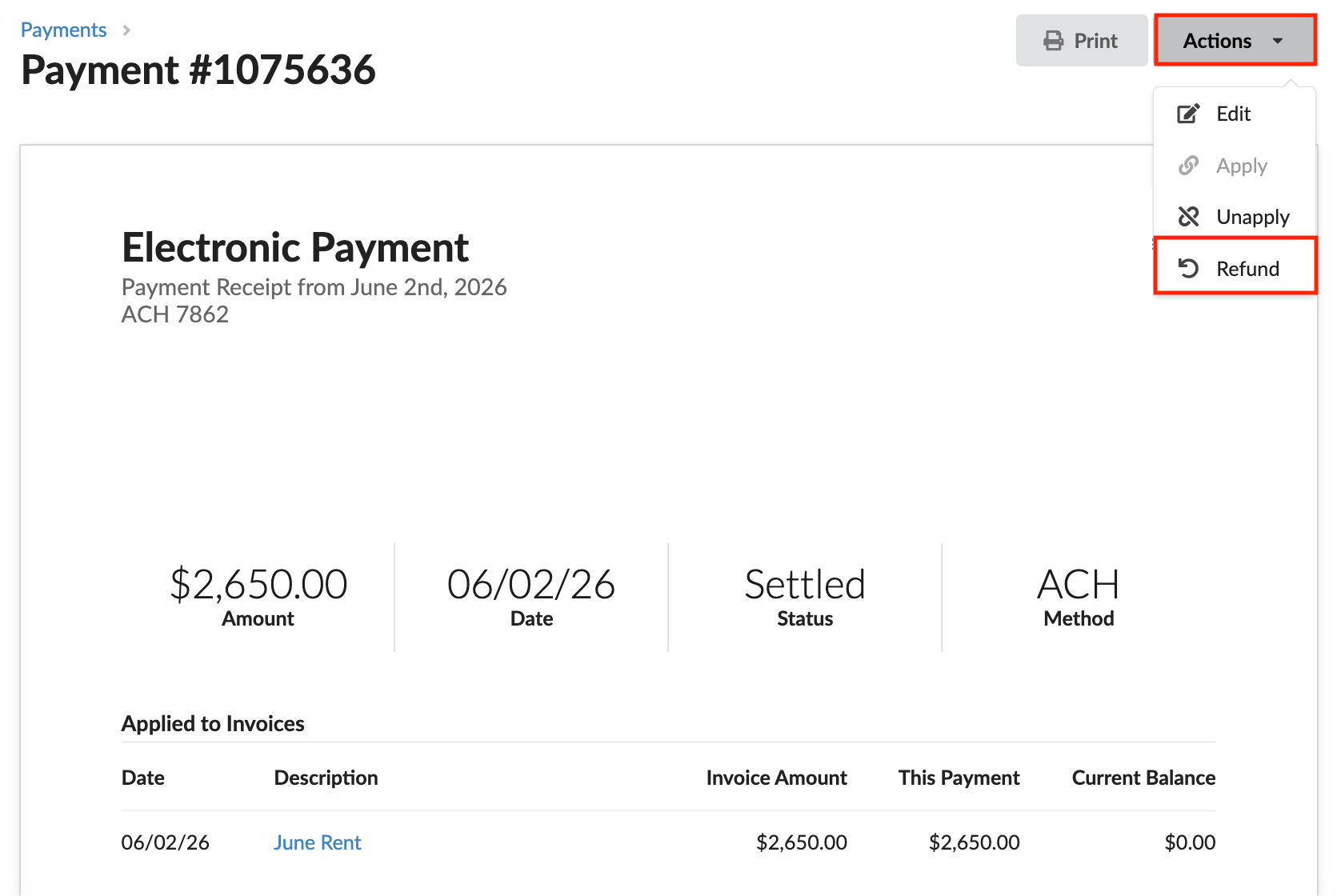
This will automatically trigger a refund to the original payment method used by the tenant. Additionally, their ledger balance will be updated to reflect that their second payment was returned to their account.
Tips & Best Practices
- Before issuing a refund, confirm that the duplicate payment has fully settled. Attempting to refund a payment that is still processing may result in an error or a failed transaction. You can verify the payment status on the payment record itself – only payments with a Settled status are eligible for refund.
- If a resident reports a duplicate payment, pull up their ledger history before taking any action to confirm a credit balance actually exists. Refunding a payment that was legitimately applied to an outstanding invoice could leave the account with an unpaid balance.
- After processing a refund, communicate the timeline to the resident. ACH refunds typically take several business days to appear in the resident's account, and proactively setting that expectation can prevent follow-up inquiries.