
Overview
Purpose: This guide explains how to set up, generate, and process management fees in Revela. Management fees are essential for tracking revenue from property management services. This guide outlines how to set up and generate fees efficiently within the Revela platform.
Target Audience: Property managers, financial administrators, and portfolio managers.
Step-by-Step
Accessing the Portfolio-
Navigate to Portfolios (left menu) in Revela.
- Note: The tab is named Properties for clients that do not have multiple Portfolios
-
Select the entity for which you want to create management fees
Setting Up a Management Contract
- Before generating management fees, ensure a management contract is in place
Generating Management Fees
- Once the management contract is established, follow these steps to generate management fees automatically:
-
-
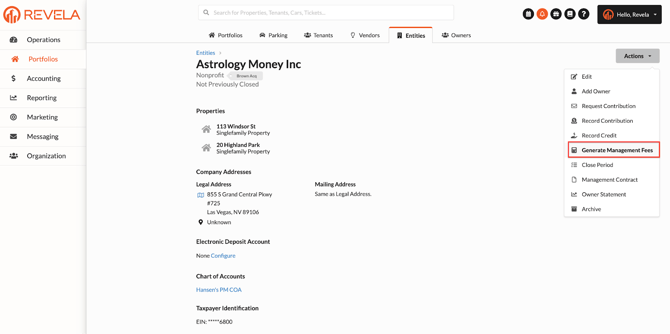
Click Actions (dropdown) under the correct Entity
-
Select Generate Management Fees
-
Set the Effective Date for the fees (current or past date can be used)
-
Payment Processing Options
- When generating management fees, you can choose how payments are handled:
- Mark as Paid
-
No additional processing required
-
Fees will be recorded as part of financial reviews
-
- Not Marked as Paid:
-
Requires manual processing of management fee payments
-
Fees remain as pending transactions until cleared
-
- Mark as Paid
Finalizing the Process
-
Click Submit to complete the management fee generation process
-
Fees will now be reflected in financial reports and revenue tracking
Best Practices & Tips
✔ Ensure contracts are configured properly before generating fees.✔ Use automated fee generation to streamline revenue tracking.
✔ Regularly review financial reports to ensure fees are accurately recorded.
Common Issues & Troubleshooting
Issue 1: Management Fees Not Generating- Solution: Verify that a valid management contract is in place for the entity.
- Solution: Manually process payments to reflect in financial records.
Solution: Check the contract setup to confirm fee percentages and terms are correct.
Link to Video