
Overview
-
Purpose: This guide outlines how to configure rental criteria within Revela to establish thresholds for applicant approval, conditional approval, or denial.
-
Target Audience: Property managers, leasing agents, and admins.
Step-by-Step
Step 1: Access Rental Criteria Configuration
-
Navigate to the Organization Tab in Revela.
-
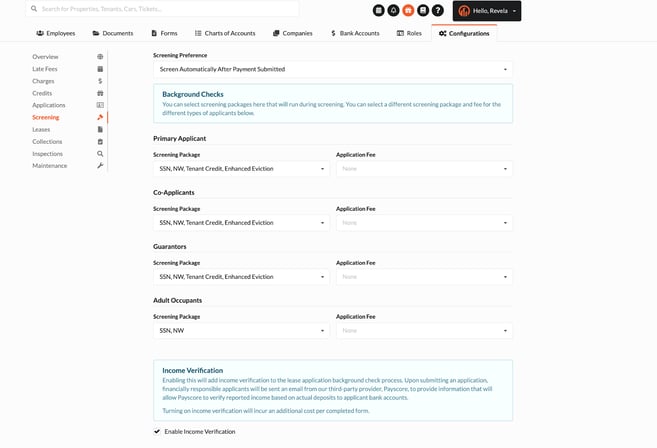
Select Configurations > Screening.
-
Here, you can view and update the rental criteria for each property your company manages.
-
Step 2: Understand Rental Criteria Categories
Rental criteria include thresholds that determine the applicant’s leasing outcome. These decisions include:
-
Approved: When the applicant meets or exceeds all thresholds.
-
Approved with Contingencies: When rental history, credit history, or length of employment falls below established thresholds.
-
Approved with Qualified Cosigner: Typically used when the applicant's income is below the required threshold.
-
Denied: When one or more deniable factors are present.
Step 3: Establish Key Rental Criteria Factors
When setting rental criteria, consider including the following factors:
-
Credit Score: Minimum credit score required for approval.
-
Criminal History: Evaluate applicants based on criminal background checks.
-
Eviction History: Review prior eviction records as part of the criteria.
-
Monthly Income: Define income-to-rent ratios for approval or conditional approval.
-
Age: Include age requirements for age-restricted properties (if applicable).
Best Practices, Tips, and Notes
-
Align thresholds with company policies and property-specific requirements.
-
Regularly review and update criteria to comply with fair housing laws and market trends.
-
Provide clear documentation to applicants for transparency in decision-making.
Common Issues & Troubleshooting
Issue 1: Criteria not applied to a specific property.
-
Solution: Verify that the rental criteria are correctly assigned under the property configurations.
Issue 2: Applicants being auto-denied for incorrect thresholds.
-
Solution: Double-check threshold settings for accuracy in the screening configuration.