
Overview
- Purpose: How to do multiple Invoices to tenants at one time.
- Target Audience: Property managers, accounting staff, and admins.
Step by Step
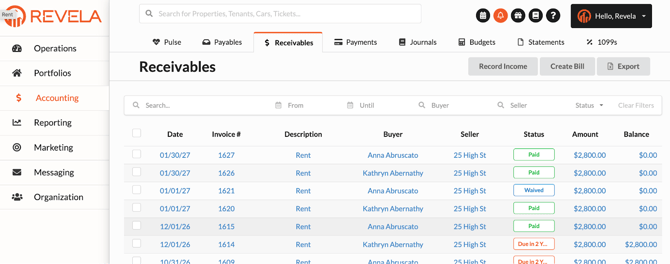
- Accounting Tab > Receivables > "Create Bill"
- Creating a Bill
-
- Click on “Create Bill” in the right hand corner
- Fill out the details such as:
- Property you are billing from
- Tenant you are billing to
- Post dates and due dates as needed
- (Invoice number is generated automatically)
- Choose a GL account
- Input the payment description and amount.
- Add notes and attachments if needed.
- Add notes and attachments if needed.
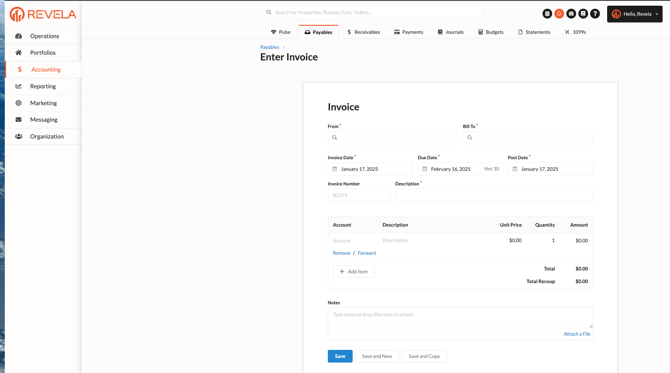
- Saving the invoice by clicking
- “Save” to a new receivable invoice.
- “Save and New” to save the current invoice and generate a different one.
- “Save and Copy” to save the current invoice and duplicate.
- Managing Invoices
- Edit details of the invoice using the "Actions" button.
- “Mark as paid” when payment has been made outside of Revela
- “Waive” when you decide not to collect the money from a chapter, but still record it in other accounts such as expenses or bad debt.
- “Void” when you want to cancel the invoice and reverse the process of creating the bill.
- “Edit” to make adjustments to invoice
- Edit details of the invoice using the "Actions" button.
- Setting a Billing Schedule
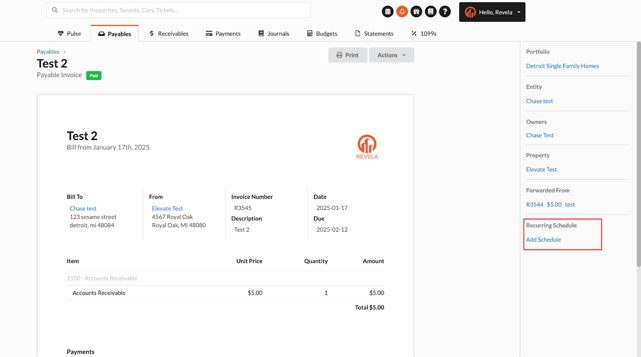
- Schedule recurring invoices by specifying frequency and duration.
- Save the schedule to automate future billings.
- Cancel or stop scheduled invoices if needed.
- Details
- Access journal entry details to see account information for the transaction.
- View all previous activities made to the invoice under the “History” section when you scroll all the way down.
- Each blue text will have a hyperlink that takes you to the necessary fields.