
Overview
-
Purpose: This guide explains how to efficiently manage, prepare, and send documents within Revela, including lease agreements, membership agreements, and vendor packets.
-
Target Audience: Property managers, leasing agents, and administrative staff handling documentation.
1. Introduction to Document Management
Revela provides a centralized document management system for:
-
Leasing agreements – Automating lease documentation.
-
Membership agreements – Handling tenant and organizational agreements.
-
Vendor documents – Managing communications with service providers.
-
Any other type of documents
Users can access and organize document templates, reducing manual paperwork.
2. Accessing Organization Documents
To view and manage templates:
-
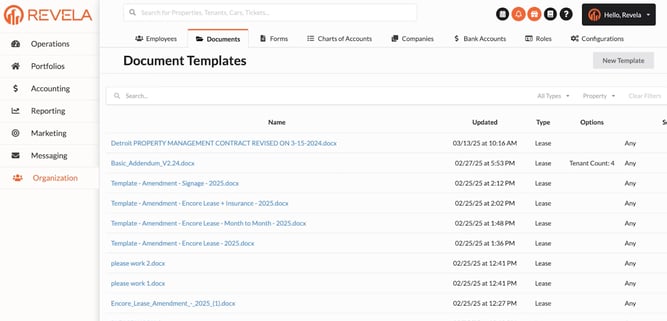
Navigate to Organization > Documents.
-
View existing document templates that have been uploaded into the system.
Templates are pre-tagged to auto-fill key information, streamlining the documentation process.
3. Understanding the Document Tagging Process
What is Document Tagging?
-
Tagging refers to the tokenization of document fields, allowing Revela to auto-generate information such as:
-
Tenant name
-
Signature field
-
Lease start and end dates
-
Support Team’s Role:
-
Before a document is uploaded, the Revela support team ensures that tagging is properly configured to prevent errors.
4. Reviewing Sample Documents
To test how a document appears before finalizing:
-
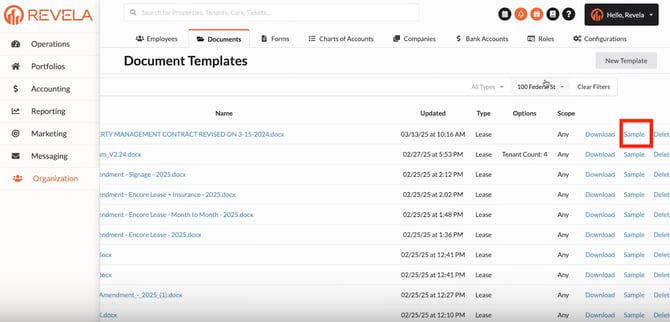
Click on the “sample” document to preview it.
-
Note: Sample documents do not display signatures, but all other auto-filled details will appear as expected.
-
This ensures proper formatting and accuracy before sending.
5. Filtering Documents for Easy Navigation
Users can filter documents by:
✔ Property – View documents relevant to a specific building or unit.
✔ Document Type – Select lease agreements, letters, vendor contracts, etc.
This helps quickly locate necessary documents without searching manually.

6. Preparing Documents for Leasing
To create a new lease document:
-
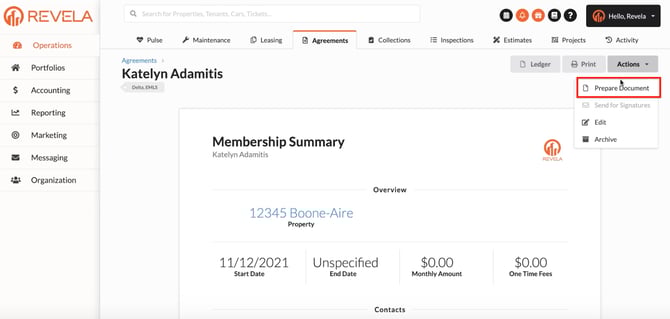
Navigate to Actions > Prepare Document.
-
Select from all available lease-related templates.
-
Revela auto-fills tenant information, reducing manual input.
This simplifies lease generation for property managers.

7. Preparing Documents for Membership Agreements
To create a new membership agreement:
-
Go to Agreements > Prepare Document.
-
Select from the list of available membership agreements.
-
Customize fields if necessary before sending for approval.
8. Sending Letters & Notices to Tenants
To send official documents (e.g., reminders, payment notices):
-
Navigate to the tenant’s profile.
-
Click on Actions > Email Document.
-
Choose from letter templates and send them directly.
This feature streamlines tenant communication without needing external email services.

9. Additional Document Use Cases
Beyond leases and membership agreements, users can manage:
Vendor Packets – Used for contractor agreements and communication.
Legal Notices – For property violations, lease violations, and general announcements.
10. Conclusion
✔ Revela’s document management streamlines leasing, membership, and vendor agreements.
✔ Tagging and auto-filling reduce manual work, ensuring accuracy.
✔ Filtering and templates make navigation and organization easy.
For additional guidance, watch the video tutorial below: