Overview
-
Purpose: This guide explains how property managers can create a credit preset which can be used when crediting tenants for miscellaneous items (rent, late fees, bad debt, etc.)
-
Target Audience: Property managers
Step-by-Step
- Select Add Credit.
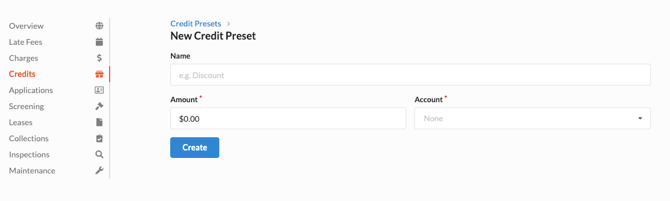
- Enter the required details of the credit.
- Name - This is the name of the credit that will appear on the tenant ledger
- Amount - This is a predetermined amount which can be used to streamline the process. If there is no predetermined amount, leave this as $0.00
- Account - The GL Code to which this credit should be applied.
- Click Create.