Overview
-
Purpose: This guide explains how property managers can create a charge preset which can be used during the application, leasing, and miscellaneous scenarios for invoicing tenants.
-
Target Audience: Property managers
Step-by-Step
-
Select Add Charge.
-
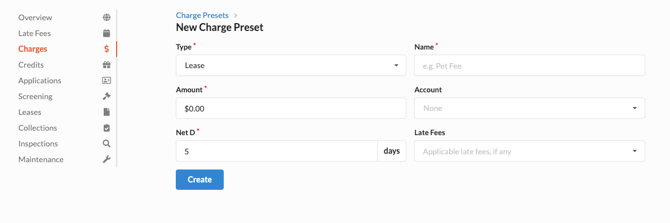
Enter the required details of the charge.
-
Type - The stage of the tenant lifecycle where the charge will appear on the tenant’s ledger
-
Application - When a tenant is applying
-
Lease - When the property manager is creating the lease
-
Incidental - Miscellaneous or one time charges
-
Move Out - When moving a tenant out of a unit
-
-
Name - This is the name of the charge that will appear on the tenant ledger
-
Amount - This is a predetermined amount which can be used to streamline the process. If there is no predetermined amount, leave this as $0.00
-
Account - The GL Code to which this charge should be applied.
-
-
Click Create.
IMPORTANT REMINDER: You may see multiple Rent charge presets in this section. This is because a charge preset may be created for the Leasing and Incidental stages. This is expected behavior if you wish to charge rent during the lease creation process and if you need to send a one time charge for rent in the future.