Overview
-
Purpose: This guide explains how property managers can set minimum balance requirements before a demand letter will be issued as well as which party is charged the demand letter fee.
-
Target Audience: Property managers
Step-by-Step
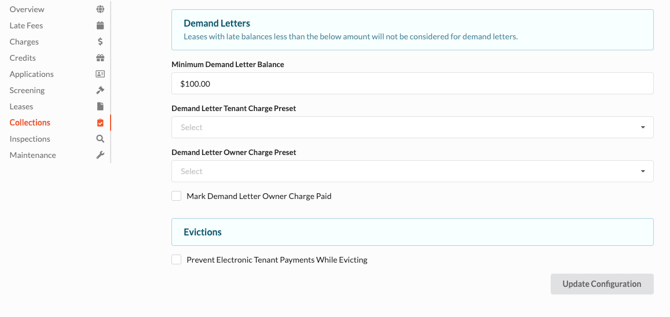
Minimum Demand Letter Balance - This is the minimum amount outstanding before a demand letter will be issued. (see Collections to initiate a demand letter)
Demand Letter Tenant Charge Preset - If the tenant should be charged a demand letter fee upon the letter being issued, this can be automated by selecting a charge preset.
Demand Letter Owner Charge Preset - If the owner should be charged a demand letter fee when a letter is issued, choose the appropriate charge preset.
- Mark Demand Letter Owner Charge Paid - This checkbox allows the property manager to use the credit balance from funds collected to apply to the demand letter charge before disbursements are completed.
Evictions
- Prevent Electronic Tenant Payments While Evicting - When a tenant is moved to Evictions, this checkbox turns off electronic payments which forces the tenant to contact the property manager before an electronic payment can be made.
IMPORTANT REMINDER: If you have not created a charge preset for demand letters, navigate to the Charges section of the configuration and select Create Credit.
- Enter the name of the credit, amount, and select the correct GL code, and click Create.
- Return to the Collections section of the configuration which will now have the correct preset available in the drop down menu.