
Overview
- Purpose: This guide walks through the configuration options available in the Availability and Tours section of the system. These settings control how your property listings appear on your public website, how prospective tenants can engage with those listings, and how applications are submitted and reviewed.
- Target Audience: Property managers
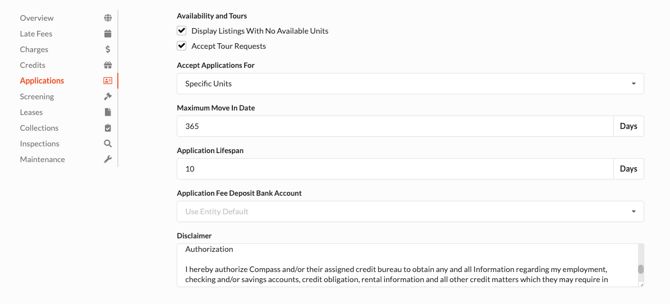
Availability and Tours - This section allows you to decide which property listings will be made public on your website.
- Display Listings With No Available Units - All published listings will populate on the listings website link. If there are no available units for rent, the property will still show, but show a contact us button.
- Accept Tour Requests - This checkbox allows prospects to complete a contact us form which will create a guest card with a tour request. You can contact the prospect once this is created.
Accept Applications For - This allows you to choose between Specific Units and Floor Plans.
- Specific Units - Prospects can complete an application for a specific unit they are interested in.
- Floor Plans - Prospects can apply for a specific floor plan offered by the property management company. The Property Manager can place the approved tenant into a unit that aligns with the interested floor plan.
Maximum Move In Date - The number of days a tenant can apply for a future vacancy. This is referred to the available amount of time from application to move in that you allow. For example, if this is configured to 31 days, a prospect cannot apply to a floor plan or unit if a unit is not available within the 31 day window.
Application Lifespan - The number of days until the application expires.
Application Fee Deposit Bank Account - This is the bank account where the application fee revenue should be deposited.
Disclaimer - This is an open text field that allows property management companies to add their own custom disclaimer text. This populates on the application when a prospect is entering their information.
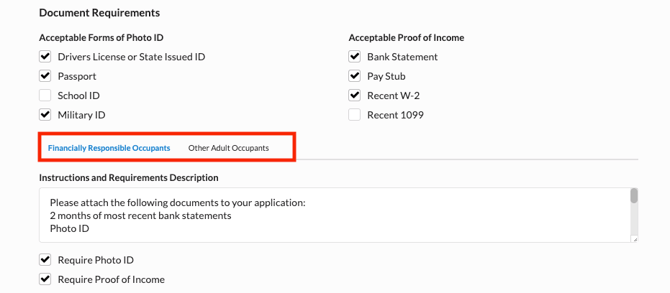
Document Requirements - Acceptable forms of photo identification and proof of income that can be uploaded within the application for review. This documentation is also used for background checks.
NOTE: The requirements can change by clicking on Financially Responsible Occupants and Other Adult Occupants. This allows you to set different requirements and instructions based on the applicant type.
Additional Questions - Add any custom questions that should also be addressed by applicants during the application process.
- Screen Automatically After Payment Submitted - This is Revela’s recommended option to ensure you are qualifying an applicant in a timely manner. Revela will automatically begin processing the background screening.
- Review Applications After Payment Submitted - Property managers can review the application after a payment is received by the applicant. Once reviewed, a background screen can be initiated.
- Review Applications Before Accepting Payment - Property managers can review an application prior to receiving payment from the applicant. Once payment is received, a background screening can be ordered.
Preleasing - The ability to charge a reservation fee to accept applications outside of the Maximum Move In Date. This is typically used to allow applications to be accepted on upcoming units that are currently being renovated or built.