As part of the transition to our new payment provider, each legal entity that collects payments through Revela will need a completed payment processing registration form to continue processing payments on the platform after August 12, 2026. Most of the information is prefilled for you — in many cases, submitting takes just a minute or two.
Know Before You Complete Your Application
Payload processing applications are completed directly within Revela. Each application will be pre-populated with as much existing entity information as possible. Completing each application (one per entity that owns a bank account) should take about 3 to 5 minutes.
Once submitted, each application will move to underwriting. Underwriting is expected to take 1 to 3 business days. If underwriting requires any supplemental information or verification, Revela will coordinate with your management company on the request.
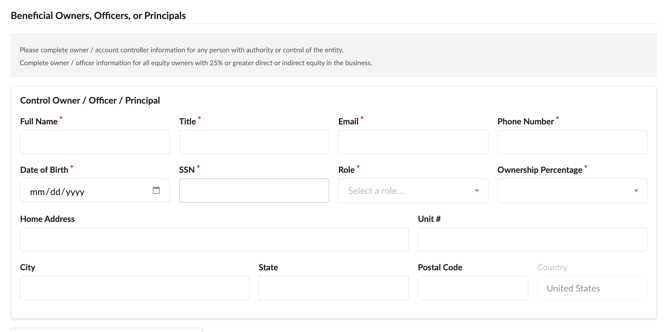
Please note that the Payload processing applications will need to identify a controlling officer for each entity you are opening a bank account for. The following information is needed for each controlling officer:
- Name
- Phone
- Date of Birth
- Social Security Number
- Role
- If you are an authorized signer or agent submitting on behalf of a homeowners association (HOA) or non-profit, select the entity structure as Non Profit/Tax-Exempt (501C).
- On the Beneficial Owners, Officers, or Principals section, select your role as "Authorized Signer" or "Agent" and elect an Ownership Percentage of 0%.
- If you are an authorized signer or agent submitting on behalf of a homeowners association (HOA) or non-profit, select the entity structure as Non Profit/Tax-Exempt (501C).
If your management company does not already have that information, or needs to confirm authority to use or submit it, you can gather or confirm that information through your normal client channels. We’ve included optional language below that your team may use or adapt:
Our property management platform, Revela, is updating its payment-processing setup. As part of that update, we need to submit a brief merchant-account application for [Entity Name]. We will take care of completing and submitting the application. To do that, we need to confirm the controlling officer or authorized signer to include on the application, along with that person’s [missing information].
This information will be used for underwriting and identity-verification purposes related to the merchant-account application. [Insert your business name here] will remain your point of contact for this process.
Please provide the requested information so we can complete the application on your behalf. We do not expect to need anything else from you in connection with the application and underwriting.
Note: We do not currently expect the controlling officer to receive notifications or communications from Revela or Payload as part of standard onboarding or underwriting. If that changes, we will coordinate with your management company first.
Finding and Completing Your Registration Forms
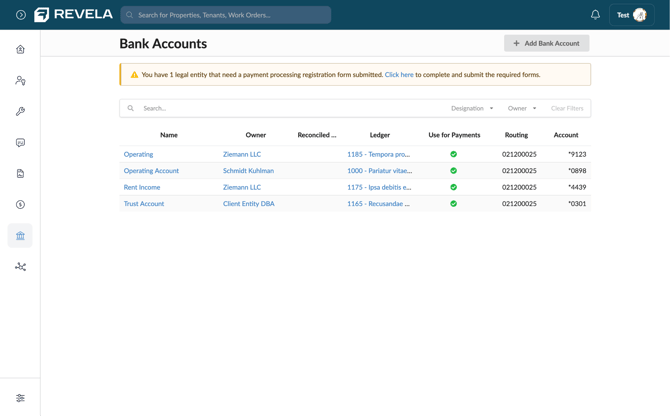
When one or more of your legal entities still needs a form submitted, a banner appears at the top of the Bank Accounts page letting you know how many are outstanding. Click the Click here link in the banner to go to the registration page. If you don't see a banner, all of your entities are already up to date and no action is needed.
Reviewing Your Progress
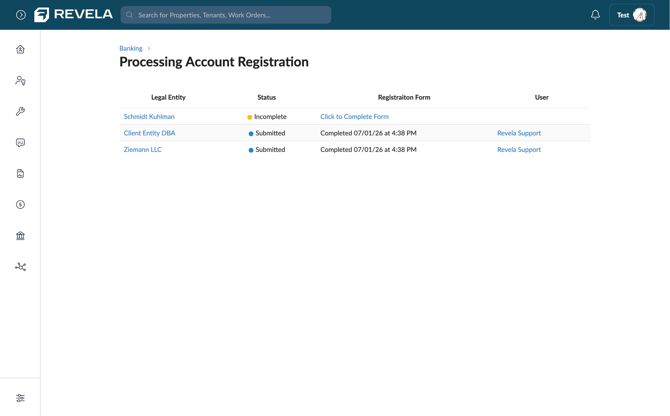
The Processing Account Registration page lists each of your legal entities along with its current status. Entities marked Submitted are complete — you'll see the date and time the form was finished, along with who submitted it. Entities marked Incomplete still need attention. Click Click to Complete Form next to any incomplete entity to open its application.
Completing the Application
The Payment Processing Account Application opens with most fields already filled in from your account, including your business name, structure, address, and contact information. Review the prefilled details for accuracy, then complete any remaining required fields (marked with a red asterisk), such as EIN and Date of Incorporation.
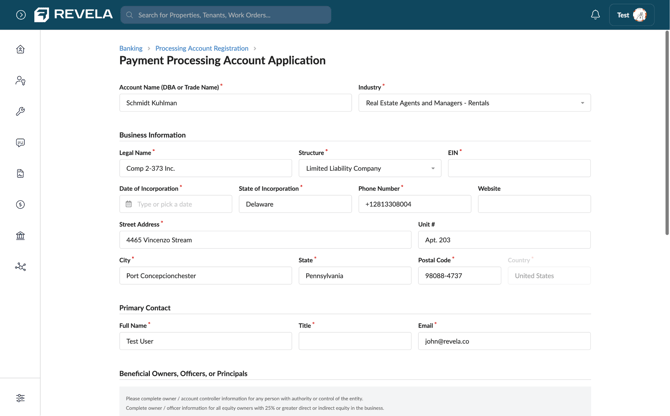
Under Beneficial Owners, Officers, or Principals, add information for anyone with authority or control of the entity, including all equity owners with 25% or greater direct or indirect ownership.
Once everything is filled in, submit the form. The entity's status on the Processing Account Registration page updates to Submitted, and no further action is needed.
Whitelisting IDs for Merchant Fees
If your bank accounts associated with Payload processing accounts have debit blockers set up, the Payload IDs will need to be whitelisted to allow merchant fees to pull automatically each month. The IDs your accountant or controller will need to add to the accounts are the following:
-
9301144000
-
9011440000
Registering a New Bank Account with Payload
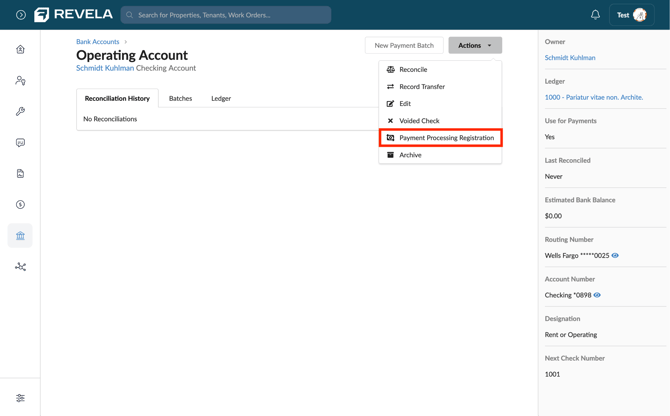
In the event that you onboard new bank accounts and need to set up new processing accounts, you’ll be able to submit the application directly within the Revela platform. The application can be reached directly from any bank account. From the Bank Accounts page, create the new account, and once created, click Actions, and select Payment Processing Registration. This is useful when you add a new account or entity down the road and want to enable payments on it.