Overview
-
Purpose: This guide explains how property managers can configure certain criteria regarding who is screened for a background check.
-
Target Audience: Property managers
-
Screening Options
-
-
RSI: RSI offers 6 screening options for property management companies to use. They have the ability to run the following options: national criminal check, county criminal check, and credit score.
-
-
-
SafeRent: SafeRent offers 3 screening options for property management companies to use. They have the ability to run the following options: national criminal check, county criminal check, credit score, multi-factor authentication.
-
Step-by-Step
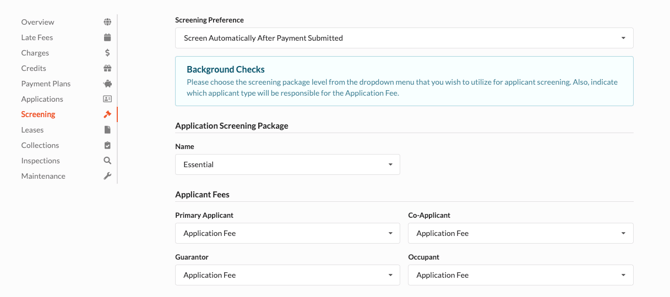
Screening Preference - This drop down menu allows you to choose when you would like to initiate a background screening to be processed:
-
Screen Automatically After Payment Submitted - This is Revela’s recommended option to ensure you are qualifying an applicant in a timely manner. Revela will automatically begin processing the background screening.
-
Review Applications After Payment Submitted - Property managers can review the application after a payment is received by the applicant. Once reviewed, a background screen can be initiated.
-
Review Applications Before Accepting Payment - Property managers can review an application prior to receiving payment from the applicant. Once payment is received, a background screening can be ordered.
Application Screening Package (SafeRent Only) - Select the appropriate SafeRent package that you chose during Onboarding. If you would like a new package, contact your Revela Account Manager! Revela will need to update the package with SafeRent prior to changing this configuration.
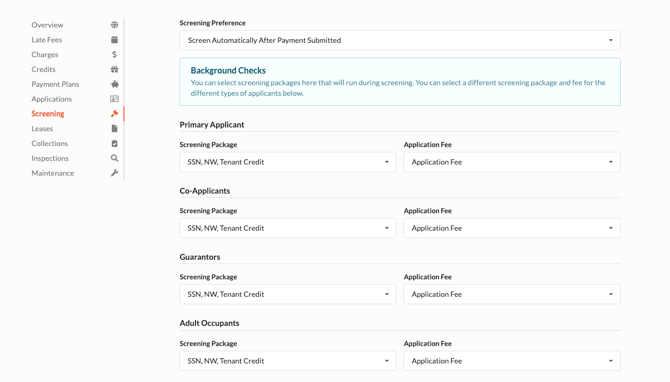
Applicant Settings (RSI Only)- Property managers can assign different screening packages and application fees based on the applicant’s designation (primary applicant, co-applicant, guarantor, adult occupant).
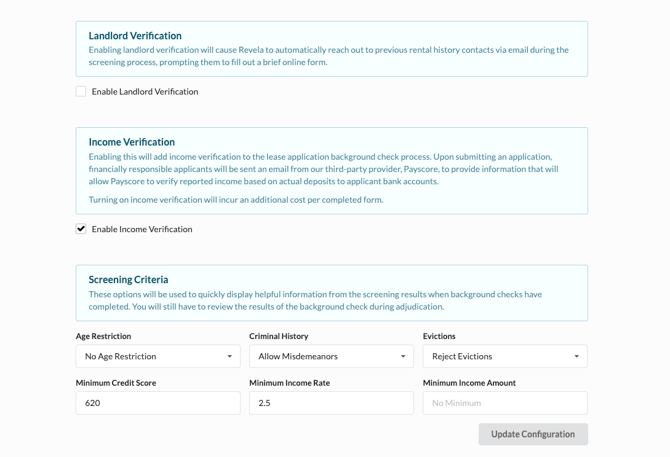
Landlord Verification - Enabling landlord verification will cause Revela to automatically reach out to previous rental history contacts via email during the screening process, prompting them to fill out a brief online form.
Income Verification - Enabling this will add income verification to the lease application background check process. Upon submitting an application, financially responsible applicants will be sent an email from our third-party provider, Payscore, to provide information that will allow Payscore to verify reported income based on actual deposits to applicant bank accounts. Turning on income verification will incur an additional cost per completed form.
Screening Criteria - These options will be used to quickly display helpful information from the screening results when background checks have completed. You will still have to review the results of the background check during adjudication.
-
Age Restriction
-
Criminal History
-
Evictions
-
Minimum Credit Score
-
Minimum Income Rate
-
Minimum Income Amount