
Overview:
-
Purpose: This guide explains how to accept applications electronically from prospective tenants through your property or company’s website.
-
Target Audience: Property managers, leasing agents, and admins.
Step-by-Step
Step 1: Direct Prospects to Apply Online
-
Use Your Website:
-
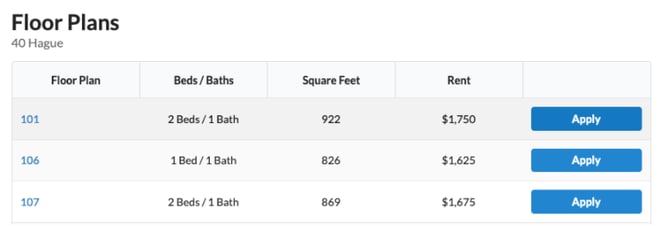
Applications are hosted via your company’s website, making it easy for prospective tenants to apply.
-
-
Encourage Prospects to Complete the Application:
-
Applicants can fill out their information directly on the website.
-
The system allows prospects to save their application and return later to complete it.
-
Step 2: Ensure Required Fields Are Completed
-
Once prospects complete all required fields, they can submit their application.
-
Upon submission:
-
A background check runs automatically based on your company’s configured criteria.
-
Application results, including the background check, will be available for review.
-
Step 3: Review Results and Make Decisions
-
Access the application results via Revela.
-
Compare the results against your company’s rental criteria to decide whether to approve, conditionally approve, or deny the application.
Application Hosting Options
-
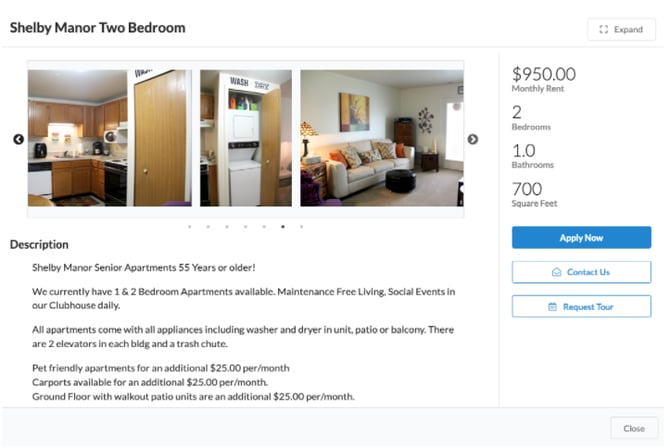
Application links are hosted using listing plugins on your company’s website.
-
The plugin can be customized as:
-
Simple Lists: Straightforward application links.
-
Elaborate Listings: Detailed property information with application options.
-
Best Practices, Tips, and Notes
-
Ensure that your rental criteria is clearly outlined to streamline decision-making.
-
Test the application process on your website to ensure links and plugins are functioning correctly.
-
Encourage prospects to save their progress if they need time to complete the application.
Common Issues & Troubleshooting
Issue 1: Applicants are unable to submit their applications.
-
Solution: Confirm that all required fields are completed and the application form is correctly configured.
Issue 2: Background checks are not running automatically.
-
Solution: Check the integration between your website’s application system and Revela for proper configuration.