
Overview
Purpose: This guide explains how to send an application to a prospect, whether they are a new applicant or an existing lead.
Target Audience: Leasing agents, property managers, and admins.
Step-by-Step
If the Applicant is NOT Already a Lead
-
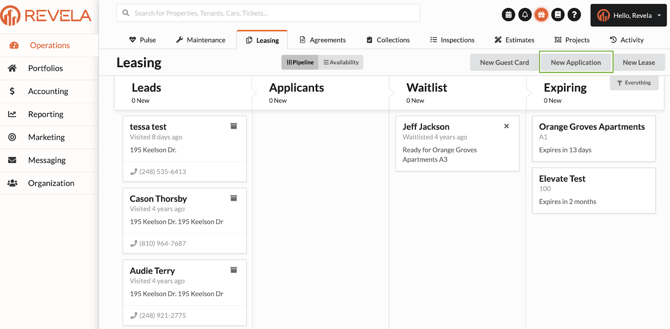
Navigate to Operations (left menu) > Leasing (top toolbar) in Revela
-
Select New Application in the upper right-hand corner
-
Select the property and floorplan that the prospect is interested in
-
Input the prospect’s email address
-
Click Send Application to send the application link to the prospect via email
If the Applicant is Already a Lead
-
Navigate to Operations (left menu) > Leasing (top toolbar) in Revela
-
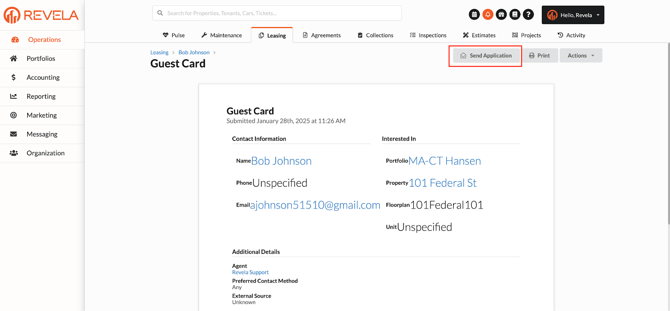
From the Leads column, select the prospect you want to send the application to
-
Click the Send Application button in the upper right-hand corner of their Prospect Profile
Best Practices, Tips, and Notes
-
Ensure the correct property and floorplan are selected before sending the application
-
If the prospect does not receive the application, verify their email address for accuracy
-
Follow up with the prospect to confirm they received the application and assist with any questions
Common Issues & Troubleshooting
Issue 1: The Send Application button is not available
-
Solution: Ensure the prospect has been added as a lead in Revela
Issue 2: The prospect did not receive the application email
-
Solution: Ask the prospect to check their Junk/Spam folders, or try resending the application