
When you need to add a charge to a tenant’s ledger that is separate from their base rent and/or lease agreement fees, you will need to add a charge to their account. Charges can be added to tenant ledgers by navigating to the user’s profile and selecting Actions > Add Charge.
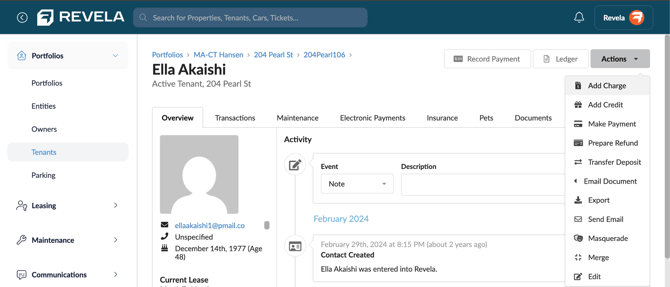
When adding a charge to a ledger, enter the following information:
- The incidental charge for the invoice.
- This corresponds to the GL code associated with the charge preset (e.g. An incidental charge named “Parking Fee” would be used to quickly create a parking fee invoice)
- Date and due date of the charge
- Description of the charge
- Amount of the charge
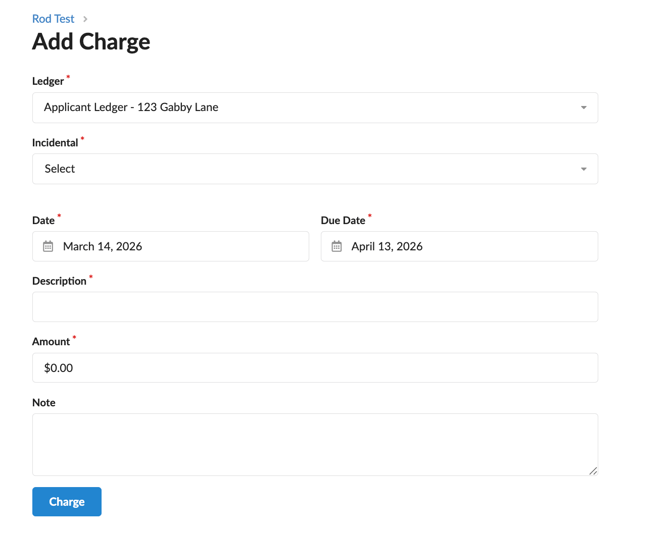
Click the Charge button to create the invoice and post it to the tenant’s ledger.
FAQS
I clicked the “Add Charge” button, but there is no incidental preset to select. What should I do?
If an incidental preset is not currently available for selection, this means that a preset for a charge has not been created in the configurations section of Revela. A new charge preset can be created within the Configurations section of your instance. For a guide on how to create a new charge preset, please click HERE.